EasyManua.ls Logo

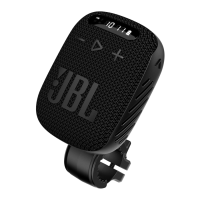
JBL Harman WIND3 - User Manual

JBL Harman WIND3
10 pages
Print Icon
To Next Page IconTo Next Page
Loading...
Bluetooth
pairing
FM RADIO
Insert TF card to play music
Plug in Aux cable to play music
TF / AUX-IN
WHAT’S
IN THE
BOX
ON
Settings Bluetooth
Bluetooth
DEVICES
Now Discoverable
Connected
JBL Wind 3
WIND3
chargING
WATERPROOF
DUSTPROOF
IP67
1m
30 mins
IP67
1 2
BUTTONS
Bicycle
Mount
Tune Down (FM) /
Previous Track
(BT/TF)
Power On / Off
Press 1s
Source Switch
Tune Up (FM) /
Next Track
(BT/TF)
Source Switch to FM
mode
Volume Down
1
TUNE DOWN / TUNE UP:
Press 1x to tune down/up by step manually
Press 2x to tune to the previous/next
preset station
AUTO SCAN:
Long Press to Enter/ Exit Auto Scan
Auto Scan will automatically search for all
available stations and save to Presets
2
FM
1
2
Install the included
mounting bracket onto
bicycle handlebars.
Dock/undock the
speaker into the
mounting bracket
effortlessly
X1
bracket
X1
non-slip pads(big)
X1
QSG
X1
non-slip pads(small)
X1
plastic screw
X1
USB cable
WIND3
Volume Up
Play/Pause*
*long press to switch EQ between 'Sport' and 'Bass' mode
Answer/ Ignore incoming call: Short press/ Long press
End on-going call: Short press
TECH SPEC
Transducer: 43 mm x 47 mm / 1.5"
Output power: 5 W RMS
Frequency response: 110 Hz - 20 kHz
Signal-to-noise ratio: > 85 dB
Battery capacity: 1050 mAh
Battery charge time: 2.5 hours (5 V 1 A)
Music play time: up to 5 hours (dependent on volume level and audio content)
Bluetooth® version: 5.0
Bluetooth® profile: A2DP 1.3, AVRCP 1.6, HFP 1.7
Bluetooth® transmitter frequency range: 2400 MHz - 2483.5 MHz
Bluetooth® transmitter power: <5 dBm
(EIRP)
Bluetooth® transmitter modulation: GFSK, π/4 QPSK, 8DPSK
FM Tuning range: 87.5 MHz - 108 MHz (varies by countries)
Dimensions (W x H x D): 90 mm x 73.2 mm x 35.8 mm
Weight: 0.230 kg
Maximum operation temperature: 45 °C

Question and Answer IconNeed help?

Do you have a question about the JBL Harman WIND3 and is the answer not in the manual?

Summary

Bicycle Mount

Whats in the Box

Device Buttons

Bluetooth Pairing

FM Radio Functionality

Switch to FM Mode

Instructions on how to select FM mode using the source switch.

Tuning and Auto Scan

Details on manual tuning and using the auto scan feature to find and save radio stations.

TF Card and AUX Input

TF Card Playback

How to play music by inserting a TF (microSD) card into the speaker.

Auxiliary Input

How to play music by connecting an external device via an AUX cable.

Charging the Speaker

Waterproof and Dustproof Rating

Summary

Bicycle Mount

Whats in the Box

Device Buttons

Bluetooth Pairing

FM Radio Functionality

Switch to FM Mode

Instructions on how to select FM mode using the source switch.

Tuning and Auto Scan

Details on manual tuning and using the auto scan feature to find and save radio stations.

TF Card and AUX Input

TF Card Playback

How to play music by inserting a TF (microSD) card into the speaker.

Auxiliary Input

How to play music by connecting an external device via an AUX cable.

Charging the Speaker

Waterproof and Dustproof Rating

JBL Harman WIND3 Specifications

General IconGeneral
Bluetooth version5.0
Battery capacity1050 mAh
PlaytimeUp to 5 hours
Charging time2.5 hours
Water resistanceIP67
Output power5W RMS
BrandJBL Harman
ModelWIND3
Speaker TypePortable Bluetooth Speaker
ConnectivityBluetooth
Battery Life5 hours
Weight230g

Related product manuals