Need help?
Do you have a question about the JBL Harman PartyBox On-The-Go and is the answer not in the manual?
Essential safety precautions for installation, operation, and handling of the apparatus.
Regulatory compliance for USA/Canada, addressing interference and radiation exposure.
Information on RF field exposure, regional use restrictions, and antenna grounding practices.
Warnings for laser safety, hearing protection, and guidelines for electronic waste disposal.
Detailed instructions for battery removal, recycling, disposal, and associated safety warnings.
Official declarations of conformity for product compliance with relevant directives.
An introduction to the manual and encouragement to read safety instructions before use.
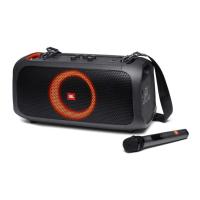
A list of all accessories included with the main unit, varying by region.
Detailed explanation of buttons, indicators, and ports on the top panel of the speaker.
Description of the various input and output ports located on the back panel.
Instructions on how to properly position the speaker for optimal performance and safety.
Steps for connecting the AC power or using the built-in battery to turn the speaker on.
Step-by-step guide to connect and stream audio from Bluetooth-enabled devices.
Instructions for connecting a USB storage device and playing audio files.
How to connect external audio via AUX and control music playback, volume, and track skipping.
Guidance on connecting microphones and guitars and adjusting their respective volume and gain levels.
Instructions for connecting and pairing the supplied wireless microphone with the speaker.
How to connect a wired microphone and replace batteries in the wireless microphone.
Connecting a guitar, mixing audio sources, and charging mobile devices via USB.
Instructions on how to safely carry the speaker using the provided shoulder strap.
How to select light effects and connect two speakers wirelessly using TWS mode.
How to restore factory settings and tips for reconnecting to Bluetooth devices.
Information on the speaker's IPX4 rating and a summary of its technical specifications.
Solutions for common system problems like power issues, unresponsive buttons, and Bluetooth connectivity.
Guidance for microphone issues and information on Bluetooth connectivity modes and power consumption.
 General
| Brand | JBL |
|---|---|
| Model | PartyBox On-The-Go |
| Category | Portable Speakers |
| Power Output | 100W |
| Battery Life | 6 hours |
| Bluetooth Version | 4.2 |
| Water Resistance | IPX4 |
| Microphone Input | Yes |
| USB Playback | Yes |
| Signal-to-noise ratio | >80dB |
| Battery charge time | 3.5 hours |
| Bluetooth profile | A2DP 1.3, AVRCP 1.6 |
| Bluetooth transmitter modulation | GFSK, π/4 DQPSK, 8DPSK |
| Karaoke function | Yes |
| USB Charging Port | Yes |
| Aux Input | Yes |
| Light Show | Yes |
| Frequency response | 50Hz - 20kHz |
| Battery type | Lithium-ion |
| Bluetooth transmitter frequency range | 2.402GHz - 2.480GHz |
| USB file format | mp3, wma |

 To Next Page