EasyManua.ls Logo

JBL MEDIA 2000 - System Operation; Media 2000 Controls; Media 2000 Directional Adjustment

JBL MEDIA 2000
8 pages
Print Icon
To Next Page IconTo Next Page
To Previous Page IconTo Previous Page
Loading...
3. Operation
Media 2000
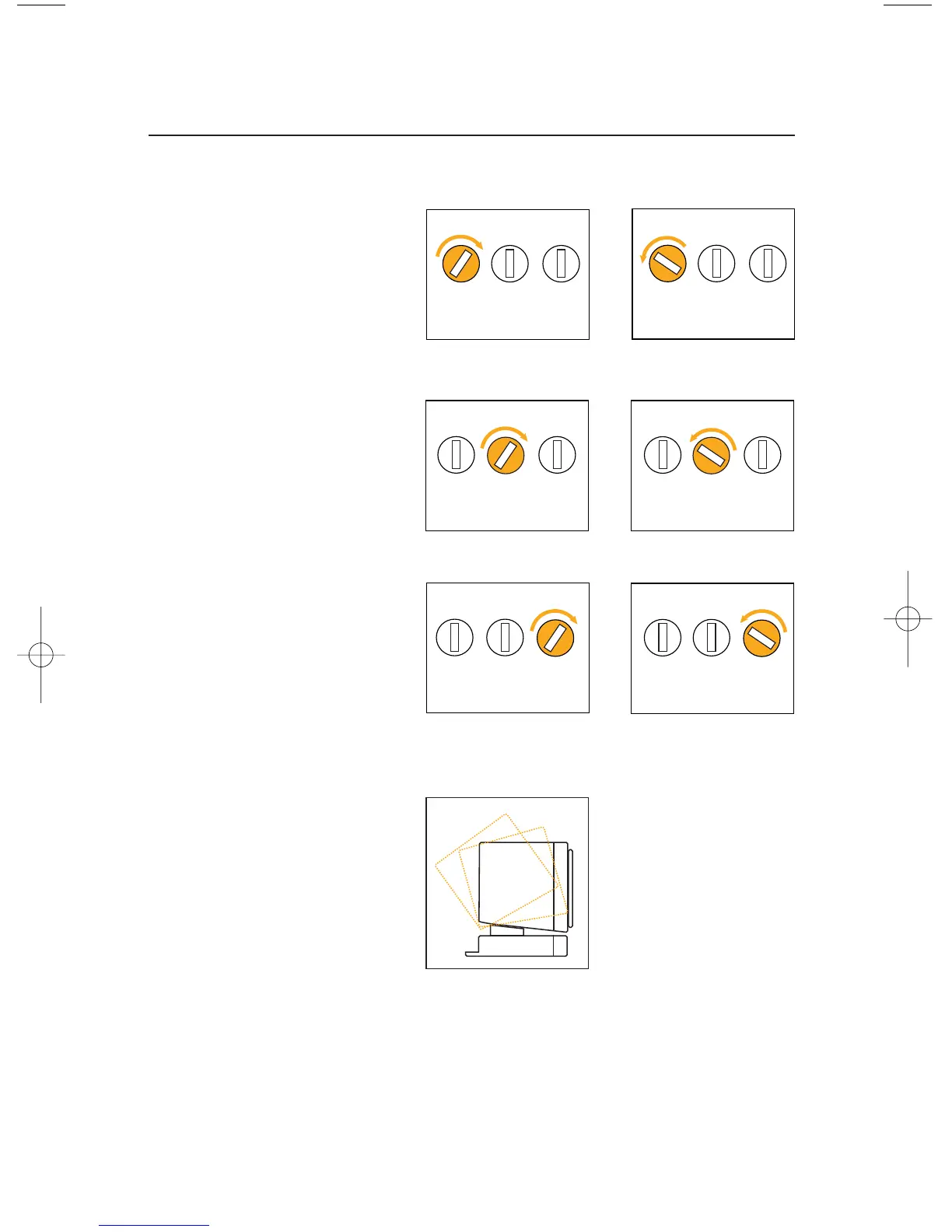
Volume:
To raise the volume level,
rotate the
volume
knob
clockwise.
To lower the volume level,
rotate the
volume
knob
counterclockwise.
Treble:
To raise the treble level,
rotate the
treble
knob
clockwise.
To lower the treble level,
rotate the
treble
knob
counterclockwise.
Bass:
To raise the bass level,
rotate the
bass
knob
clockwise.
To lower the bass level,
rotate the
bass
knob
counterclockwise.
Volume Treble Bass
Volume Treble Bass
Volume Treble Bass
Volume Treble Bass
Volume Treble Bass
Multiposition directional
adjustment
The Media 2000 speakers
incorporate a multiposition
directional adjustment that
allows you to tilt the speak-
ers toward the listening
area. This allows you to
position the speakers for
ideal sound reproduction
and imaging.
Media2000 OM 9/11/98 2:38 PM Page 6

Related product manuals