EasyManua.ls Logo

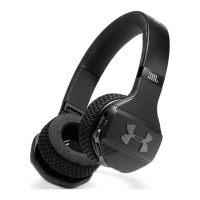
JBL Under Armour SPORT WIRELESS TRAIN - User Manual

JBL Under Armour SPORT WIRELESS TRAIN
14 pages
Print Icon
To Next Page IconTo Next Page
Loading...
SPORT WIRELESS TRA I N
ON-EAR SPORT HEADPHONES
贴耳式无线运动耳机
Question and Answer IconNeed help?

Do you have a question about the JBL Under Armour SPORT WIRELESS TRAIN and is the answer not in the manual?

Summary

Whats in the Box

Charging Cable

Includes the cable for charging the headphones.

Detachable Audio Cable with Remote

Allows wired connection with an in-line remote for control.

Documentation and Accessories

Lists included guides, cards, and carrying case.

Product Overview

Buttons and LEDs

Identifies and explains the function of buttons and LED indicators on the headphones.

Connections

Illustrates the different ports and connection types available.

Bluetooth Connection

Pairing and Connecting

Steps to turn on, pair, and connect the headphones to a Bluetooth device.

Reconnecting and New Devices

How headphones automatically reconnect and connect to new devices.

Operating Controls

Controlling Music Playback

Instructions for managing music playback functions like play, pause, skip, and volume.

Managing Phone Calls

Guidance on answering, ending, and handling phone calls.

Voice Assistant Activation

How to trigger Siri or Google Now via the headphones.

Special Features

TalkThru Function

How to use TalkThru for hearing ambient sounds without removing headphones.

Wired Listening Mode

Instructions for connecting and using the headphones via the audio cable.

Ear Cushion Maintenance

Removing Ear Cushions

Steps for gently peeling the ear cushions away from the earcup.

Hand Washing Instructions

Procedure for washing ear cushions with soap and water.

Reattaching Ear Cushions

Guidance on correctly reinserting and securing the ear cushions.

LED Behavior Indicators

Understanding LED Status

Explains the meaning of different LED light behaviors for status updates.

Summary

Whats in the Box

Charging Cable

Includes the cable for charging the headphones.

Detachable Audio Cable with Remote

Allows wired connection with an in-line remote for control.

Documentation and Accessories

Lists included guides, cards, and carrying case.

Product Overview

Buttons and LEDs

Identifies and explains the function of buttons and LED indicators on the headphones.

Connections

Illustrates the different ports and connection types available.

Bluetooth Connection

Pairing and Connecting

Steps to turn on, pair, and connect the headphones to a Bluetooth device.

Reconnecting and New Devices

How headphones automatically reconnect and connect to new devices.

Operating Controls

Controlling Music Playback

Instructions for managing music playback functions like play, pause, skip, and volume.

Managing Phone Calls

Guidance on answering, ending, and handling phone calls.

Voice Assistant Activation

How to trigger Siri or Google Now via the headphones.

Special Features

TalkThru Function

How to use TalkThru for hearing ambient sounds without removing headphones.

Wired Listening Mode

Instructions for connecting and using the headphones via the audio cable.

Ear Cushion Maintenance

Removing Ear Cushions

Steps for gently peeling the ear cushions away from the earcup.

Hand Washing Instructions

Procedure for washing ear cushions with soap and water.

Reattaching Ear Cushions

Guidance on correctly reinserting and securing the ear cushions.

LED Behavior Indicators

Understanding LED Status

Explains the meaning of different LED light behaviors for status updates.

JBL Under Armour SPORT WIRELESS TRAIN Specifications

General IconGeneral
BrandJBL
ModelUnder Armour SPORT WIRELESS TRAIN
CategoryWireless Headphones
LanguageEnglish

Related product manuals