· 15 ·
REF.54291
AUTOMATIC MODE
Using this function, the machine will perform automatically
the selected operations.
First, you need to set the parameters and then the machine
will go through all the processes automatically.
Before running, you must empty the used oil bottle entirely
and ll enough new oil into the new oil bottle.
Select the Automatic mode function and press the ENTER
key.
Set parameters:
- Flushing: Yes/No
- Flushing time
- Vacuum time
- New oil quantity
- Refrigerant quantity
Press the ENTER key to start.
When nished, it will stop automatically.
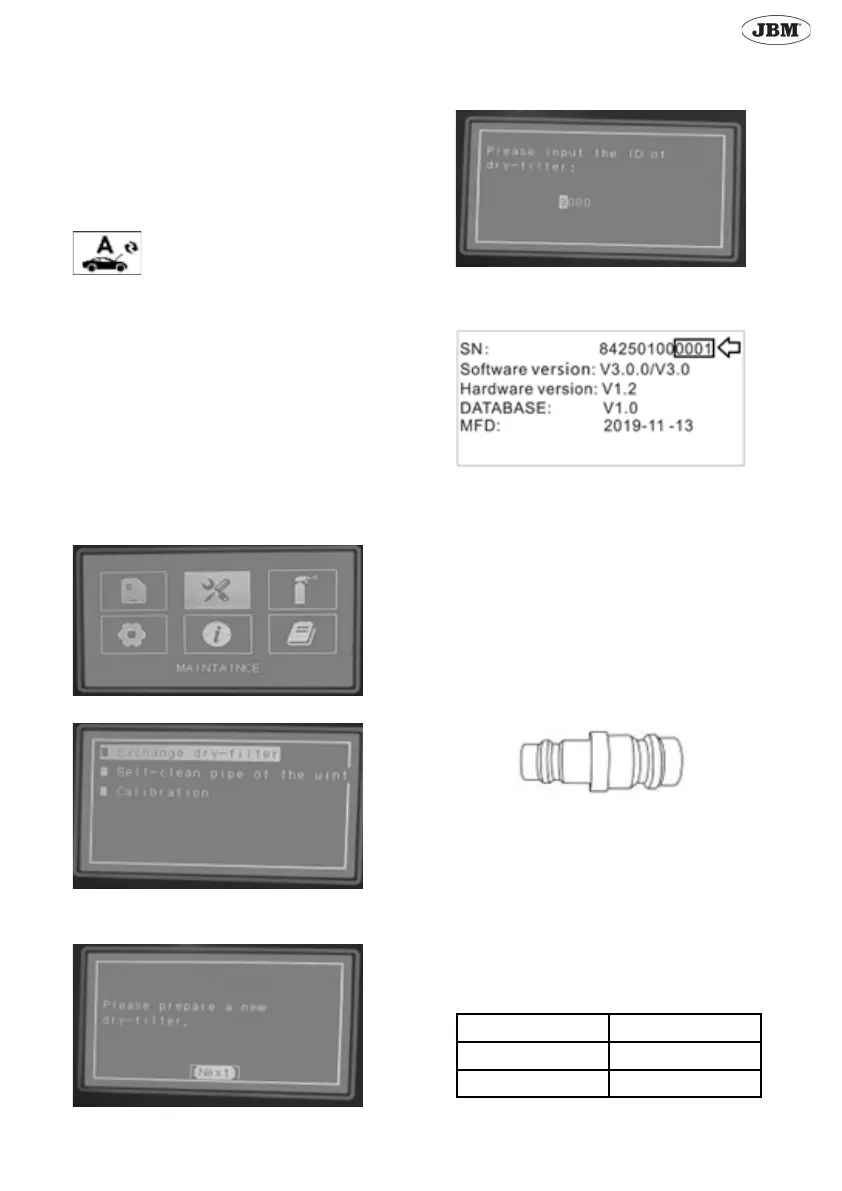
MAINTENANCE
Select “Maintenance” and press ENTER.
Select Exchange dry-lter
Take out the old lter and put a new one.
After changing the lter press ENTER.
Enter the code of the dry-lter by pressing UP/DOWN keys.
Note: The code are the last four digits of the serial number.
Hose cleaning
After two months of using the machine, you should perform
a hose cleaning.
Also, if you want to change the type of refrigerant make sure
you perform this operation previously.
Use this adaptor to connect the two hoses.
Follow the instructions on the screen.
Calibration
To use this function, input the password “1510”.
To perform a calibration, you will need an object with a
known weight.
Depending on the component you want to calibrate, the ob-
ject should have a dierent weight.
In the table below you can nd which is the weight that
should have the object.
Component Object weight
Main tank 10-20kg
Bottle 1-3kg



 To Next Page