F
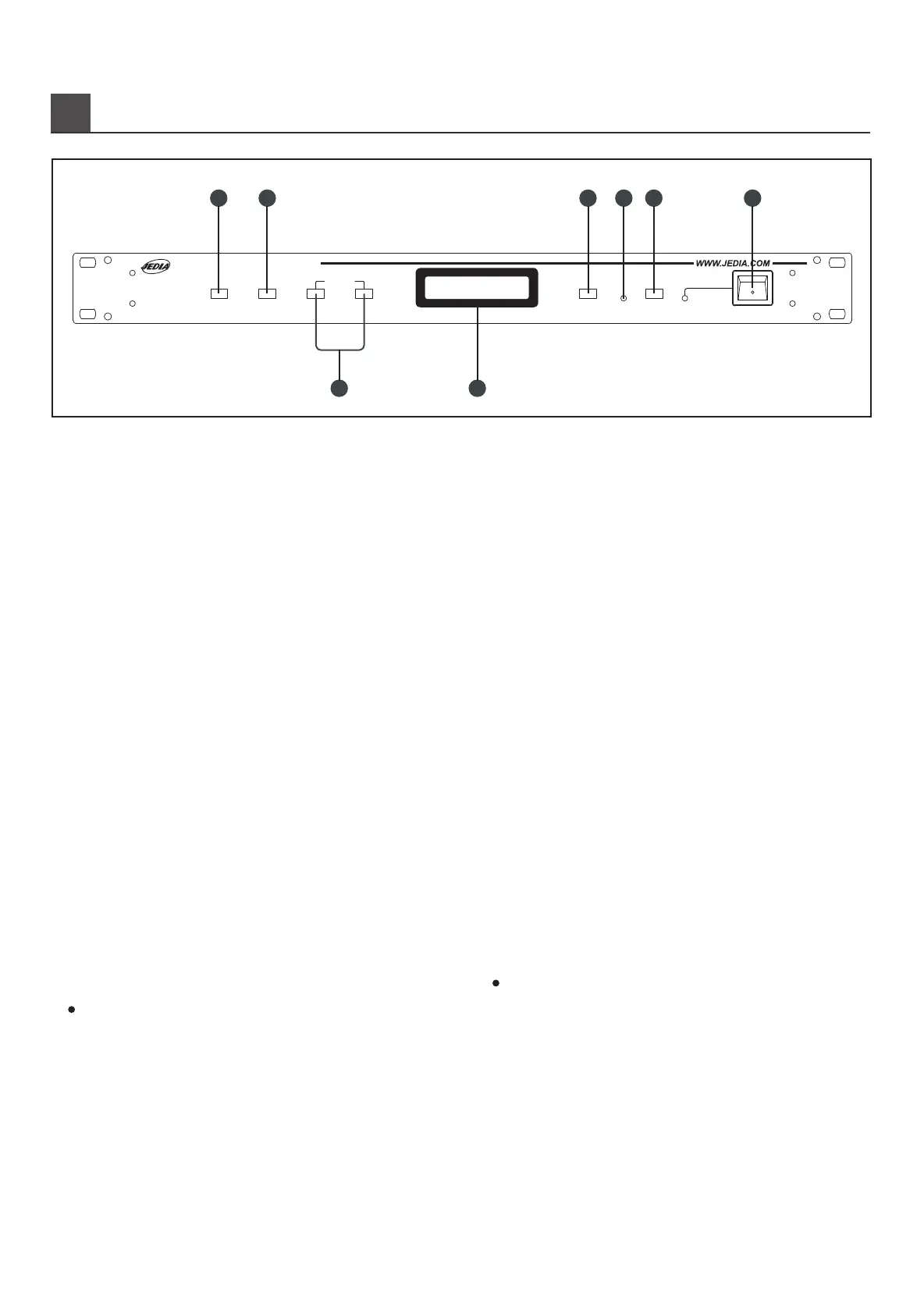
RONT PANEL CONTROLS (전면기능)
2
Pushing Check button, status of channel selectd is checking and
selected channel will be displayed on the LCD.
2. CHECK BUTTON
Setting of measurement interval which you want to have by this key
if time setting is over, the connected speaker lines are checked
automatically. Interval time adjustment is from 1 minutes from 24 hours.
Factory production is set up 1 hours.
3. TIME INTERVAL SETTING BUTTON
4. LCD (LIQUID CRYSTAL DISPLAY)
1). HOUR
Time setting is from 00 to 23 hours(total 24 hours) pushing the
key, time per hour is up to 23 hours and begin 00 hour after 23
hours. Pushing the button more than one second, time scanning
will be high speed up to the upper position automatically.
2). MINUTE
Minute setting is from 00 to 59 minutes. Pushing the button, it
increase one minute to the 59 minutes after that begin 00 minute
of next hour again. Pushing the more than one second, minute
scanning will be high speed up to the upper position automatically.
It displayes all information of equipment as 16 characters with two lines.
5. MEMORY BUTTON
Each checked channel and adjusted channel can be memoried by
memory button but, it should be memoried together with relative
functions as follows. Push channel selector button while pushing the
memory button to store selected channel. Adjust hour or minutes while
pushing the memory button to store adjusted hour or minutes. Push the
check button while pushing the memory button to check all channels.
7. BUZZER OFF BUTTON
6. SPEAKER LINE FAULT INDICATOR
LED indicator will be turn on under.
Fault situation which is checked speaker line as follows.
LINE OPEN : differ more than +25% from the measurement.
LINE IMP: OVER : +15% - +25% from the measurement.
LINE IMP: UNDER : -15% - -25% from the measurement.
LINE SHORT : differ less than -25% from the measurement.
LINE GROUND FAULT .
Buzzer will makes sound. Checked speaker line is in FAULT even
though one channel pushing the buzzer off button, buzzer sound will
stop. The fault alarm can only be abolished by pressing the "BUZZER
OFF" button.
8. POWER SWITCH
Power switch for AC INPUT.
Channel selector button is to check the channel you want. Range of
selection is up to 32 channels and channel step is from one to thirty
two by ranked over range and begin one channel to thirty two channels
again. If JSC-132A has memoried channel, it will be desplayed on
the LCD. Pushing the button more than one second, channel
scaning will be high speed when power on, checking operaton will
not act on under non selected button.
1. CHANNEL SELECTOR BUTTON
1.채널선택버튼
이버튼은체크하고자하는채널을선택하는데사용됩니다.채널의선택범
위는132채널까지이며,채널1부터채널32까지한번에한채널씩상향
조정된후다시채널1부터시작됩니다.이전에체크하여기억되었던상태가
있으면해당채널의상태가LCD에디스플레이됩니다.약1초이상계속
누르면고속으로조정됩니다.최초로전원이투입되었을경우,이버튼이
눌러지지않은상태에서는"체크"버튼을눌러도체크동작을하지않습니다.
2.체크버튼
이버튼을누르면"채널선택"버튼에의해선택된채널의라인상태를체크
하며그결과를LCD상에나타냅니다.
3.시간간격설정버튼
이버튼들은시간간격을조정하여기억시키면정해진시간마다자동으로
스피커라인상태를체크합니다.
시간간격조정은1분부터24시간까지입니다.
공장출하시기본시간은1시간으로설정되어있습니다.
4.LCD표시창
1).시간
00시간부터23시간까지총24시간의구간을설정합니다.
한번누를때마다한시간씩상향조정되며23시간이후는다시00시간
부터시작됩니다.약1초이상계속누르면고속으로상향조정됩니다.
2).분
00분부터59분까지총59분의구간을설정합니다.
한번누를때마다1분씩상향조정되며59분이후는다음시간의00
분부터시작됩니다.약1초이상계속누르면고속으로상향조정됩니다.
16문자2열로구성된LCD로서기기의모든상태를표시하는장치입니다.
5.기억버튼
체크된각채널의상태및조정된시간간격을기억시키거나,모든채널체크
기능을수행하는버튼이며,단독으로는사용되지않고해당기능을수행하는
버튼과함께사용됩니다."기억"버튼을먼저누른상태에서"채널선택"버튼
을같이누르면체크된해당채널의상태가기억됩니다.
"기억"버튼을먼저누른상태에서"시간"혹은"분"버튼을같이누르면조정된
시간간격이기억됩니다."기억"버튼을먼저누른상태에서"체크"버튼을같이
누르면모든채널을체크합니다.
7.부저음정지버튼
6.스피커라인폴트표시기
체크된스피커라인의어느한채널이라도폴트(FAULT)상태가있으면이
LED가점멸합니다.
폴트상태란다음의경우입니다.
라인오픈:(LINEOPEN:측정치의+25%이상)
라인임피던스오버:(LINEIMP.-OVER:측정치의+15%+25%)
라인임피던스언더:(LINEIMP.-UNDER:측정치의-15%-25%)
라인쇼트(LINESHORT:측정치의-25%이하)
라인그라운드폴트:(LINEGROUNDFAULT)
체크된스피커라인의어느한채널이라도폴트(FAULT)상태가있으면
부저가울립니다.이때,이버튼을누르면부저음은정지됩니다.
8.전원스위치
AC전원입력스위치입니다.
JSC-132A
SPEAKER LINE CHECKER
MEMORY
FAULT
BUZZER OFF
POWER
CHANNEL
SELECTOR
CHECK
HOUR MINUTE
INTERVAL
1 2 5 7 86
3 4
J S C - 1 3 2 A
L i n e C h e c k e r


 To Next Page
 Loading...