3
External ports
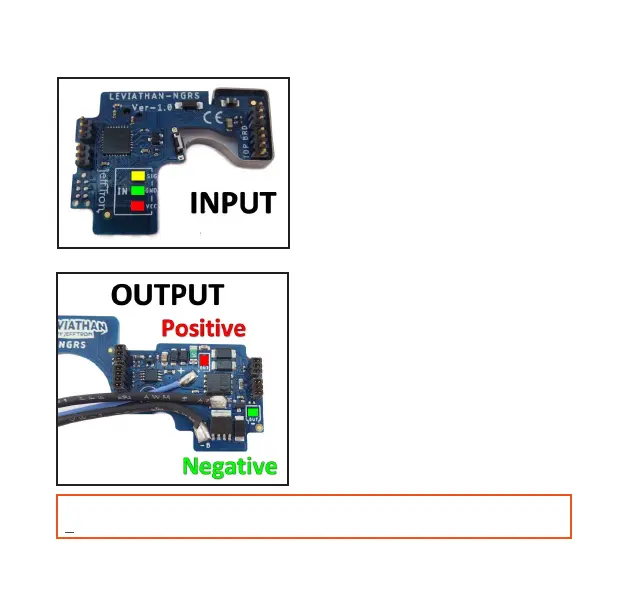
Input terminal
- Leviathan has 3 pads for connecting
external button, virtual reload or sensor.
- 3,1V is in the red area (for sensor only).
- Signal is in the yellow area.
- Negative pole is in the green area.
- External button connects on SIG and
GND pad (doesn‘t matter on polarity).
- In the app use interface „External input“
to activate desired function.
Output terminal
- Leviathan has 2 pads on the board
for powering hop-up LED illumination,
ashlight, laser, magazine motor etc.
- On the Positive pad is battery voltage
(in the red area).
- Negative pad from the motor is in the
green area, the power is fully driven
throuht the Leviathan microprocessor.
- In the app use interface „External out-
put“ to activate desired function.
- Some input functions activates output
terminal even on OFF status.
WARNING: Installation requires advanced soldering skills! Wires can‘t touch other pads
and components on the board. Damage to the Leviathan will void the warranty!



 To Next Page