16
English
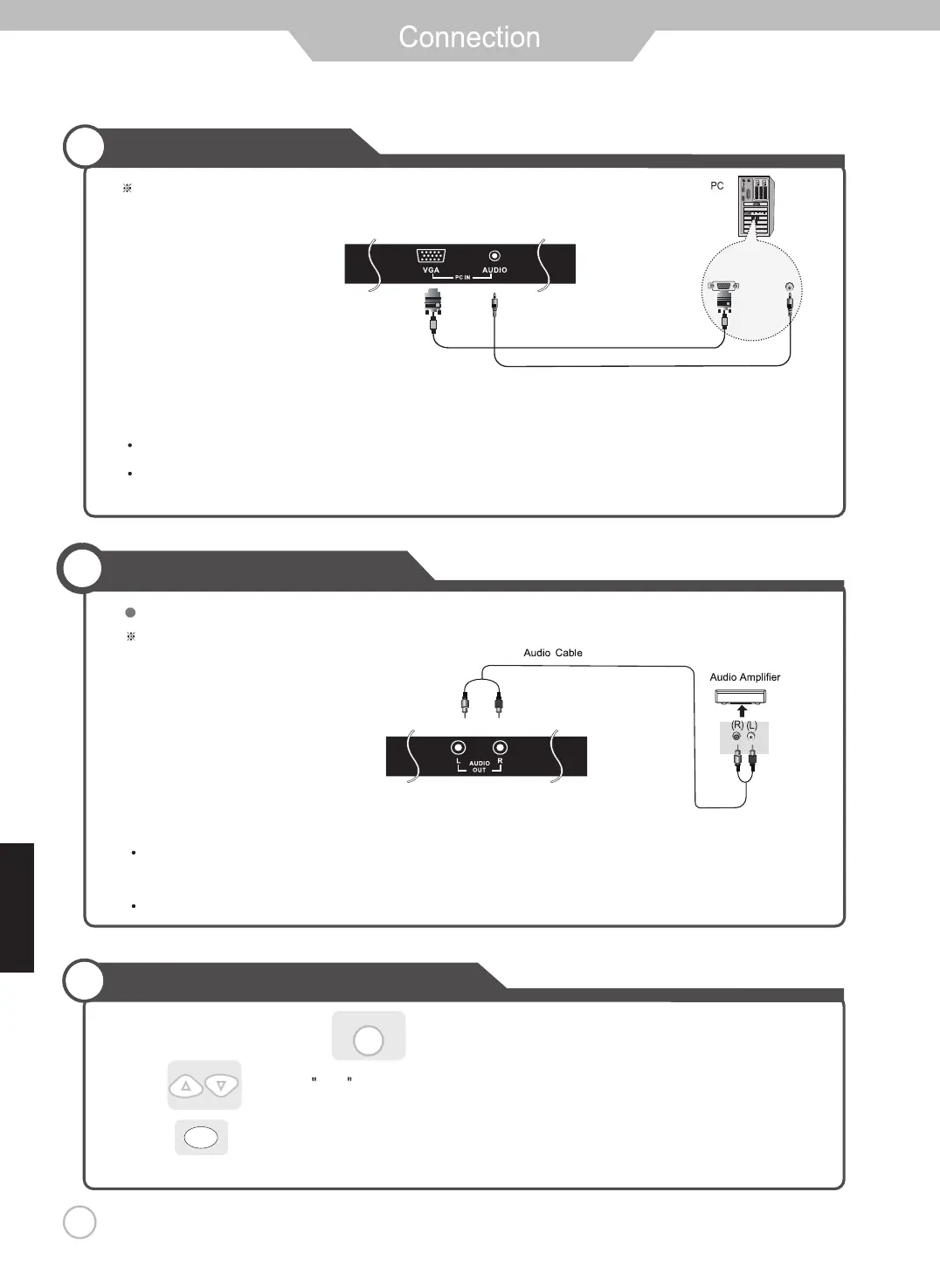
PC Connections
Terminals vary by manufacturer.
VGA Cable
PC Audio Cable
(Not Included)
(Not Included)
How to use as a PC monitor
External Audio Amplifier
Connecting to an amplifer or home theater system.
Terminals vary by manufacturer.
(Not Included)
Connect the LED TV’s PC Input terminal to the PC’s VGA terminal using a VGA cable.
(Only for PC’s with an Audio terminal)
Connect the LED TV’s AUDIO (L/R) output terminal to Audio Amplifier using an audio patch cable.
Note: The speakers of LED TV still have output audio signal at this time.
You can use the Volume +/- buttons to adjust the audio output level.
Connect the LED TV’s PC Audio terminal to the PC’s Audio terminal using a 3.5mm (Headphone) audio cable.
SOURCE
3.Press to confirm the source selection.
ENTER
1.Turn on the LED TV and press on the remote control.
2. Use to move to VGA .


 To Next Page