Need help?
Do you have a question about the JETI model MBar EX and is the answer not in the manual?
Explains connecting the sensor directly to a JETIBOX for data display.
Describes connecting the sensor via a receiver and Duplex transmitter module.
Details how to connect the sensor using an Expander for multiple sensors.
Details the options available within the MBar EX sensor menu on the JETIBOX.
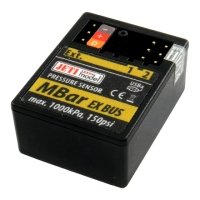
The JETI MBar EX is a sensor designed to measure high pressures of non-corrosive and unionized gases and liquids. It is compatible with the Duplex EX system, which utilizes the 2.4GHz band for communication, allowing for real-time transmission of telemetry data from the model to the transmitter. This data can be displayed on the LCD screen of a connected JETIBOX or on the display of JETI model DC/DS transmitters. The sensor is capable of recording maximum and minimum measured values for both pressure and temperature.
The primary function of the MBar EX is to measure pressure and temperature. It can be used in various applications, such as monitoring pressure in compressed air containers (e.g., for retractable landing gear systems) or controlling oil pressure in hydraulic systems. The sensor offers the ability to set alarms for excessive pressure or pressure drops, which can be signaled audibly via a JETI Tx module (EU only) or a JETIBOX profi.
Beyond its core measurement capabilities, the MBar EX can also function as an Expander, allowing for the connection of other sensors. It can detect logical voltage levels on up to two inputs, which can be used, for example, to detect the securing of chassis. The device supports the EX Bus protocol, enabling comfortable configuration through a dedicated menu in DC/DS JETI model transmitters. Firmware updates are also supported, ensuring the sensor can be kept up-to-date with the latest features and improvements.
The MBar EX features an "Ext." output for data transmission to the receiver or a connected JETIBOX, and it also serves as a power supply input. Additionally, it has two programmable ports, Ext1 and Ext2, which can be configured for various functions:
Upon connection, the JETIBOX displays sensor identification and measured pressure. The main menu, accessed by pressing the 'D' button, includes:
The MBar EX can be configured via any DC/DS transmitter if the paired receiver is in EX Bus mode and the MBar is connected to its Ext. port. The device will be automatically detected and can be configured in the "Model → Device Explorer" menu. This requires transmitter version 2.20 or newer, receiver version 3.14 or newer, and the presence of the MBAR.bin configuration file in the Devices folder of the SD card. The main screen offers a general menu for actual pressure and temperature, measured maximums and minimums, and the ability to reset min/max values manually or via a transmitter driver.
 General
| Brand | JETI model |
|---|---|
| Model | MBar EX |
| Category | Accessories |
| Language | English |

 To Next Page