Maintenance
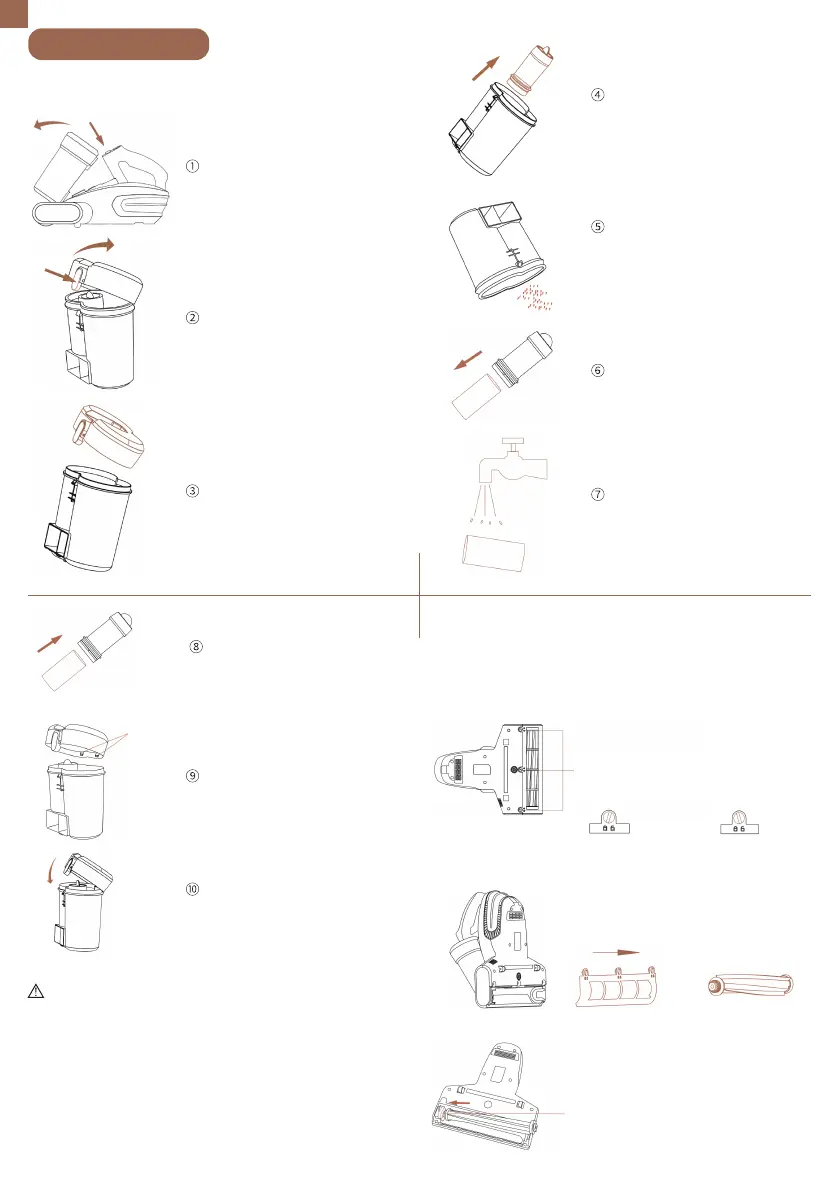
Dust cup cleaning
Press the dust cup release
button and remove the
dust cup.
Grab the top of the filter and
remove the filter from the dust
cup.
Empty the dust cup.
Take out the filter sponge.
Clean the filter and sponge.
The sponge can be washed
with water. (The filter and
sponge should be completely
dry before putting them back
into the dust cup.)
Press the lid release button
to open the lid.
Remove the lid of the dust cup.
Slide the filter sponge
through the filter and put the
filter back into the dust cup.
Align the bumps on the lid
with the bumps on the dust cup.
Close the lid of the dust cup.
(The lid will only be securely locked
when it clicks).
Bumps
Tips:
• It is recommended to clean the dust barrel and filter
sponge after each use; if the dust barrel is full in use, it is
recommended to clean it immediately, or else it will
affect the effect.
• Do not scrub the filter sponge violently when cleaning;
after washing the dust barrel assembly, make sure that
all the parts are completely dry before putting it into the
main unit.
• After the cumulative use time of the filter sponge
reaches 30-50h, it is recommended to replace it to avoid
degrading the performance of the machine.
Roller brush cleaning
Turn off the machine and unplug it. Use a coin
to turn the bottom plate locks counterclockwise
to unlock the bottom plate.
Three bottom plate locks
(rotate with coin)
Roller brush track
When installing the roller brush,
pass the roller brush through the
track in the direction shown in
the figure, so that the roller
brush can work normally.
2. Remove the
roller brush
1. Remove the
bottom plate
Locked state Unlocked state
EN
02


 To Next Page