18
Operation
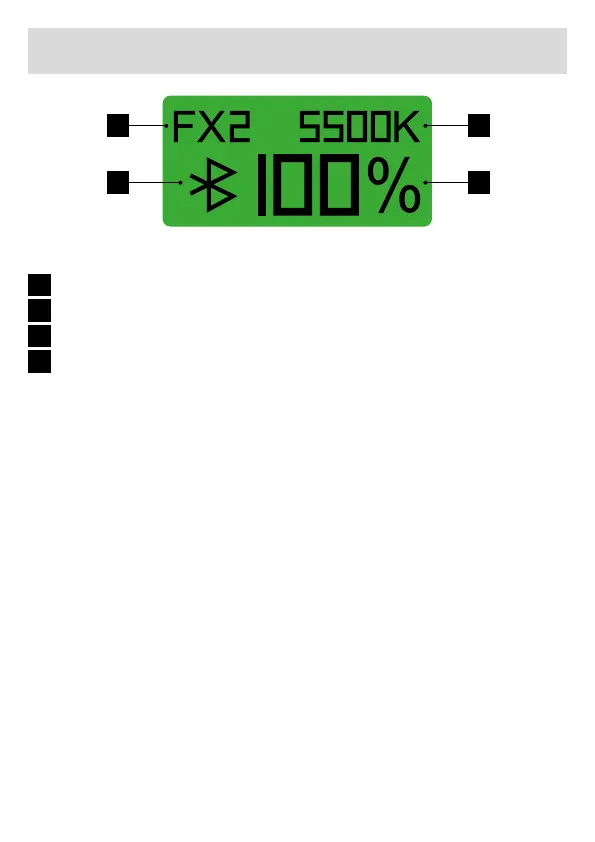
1 3
2 4
1
2
3
4
Light effect
Bluetooth®* display
Colour temperature
Output power
Power supply
• Use with mains cable: Insert the plug of the mains adapter into the
mains adapter socket of the EFD-60, connect the mains voltage,
switch on the unit via the on/off switch and the LC display lights up.
• Use with separate battery adapter: Mount the separately available
battery adapter with handle and 2 NP-F970 batteries** to your LED
light. Insert the mains plug of the battery adapter into the mains
adapter socket of the LED light, switch on the unit via the on/off
switch and the display lights up.
Adjusting the brightness
• Turn the power control knob directly to adjust the brightness. The
power indicator has a black background. The dimming range is 0 ~
100 %, the accuracy is 1 %.
• Briey press the power control knob once (EFD-60M) or twice
(EFD-60Bi) so that the power display is no longer black and then
turn it to adjust the brightness in 10% steps.


 To Next Page