30
Function Description
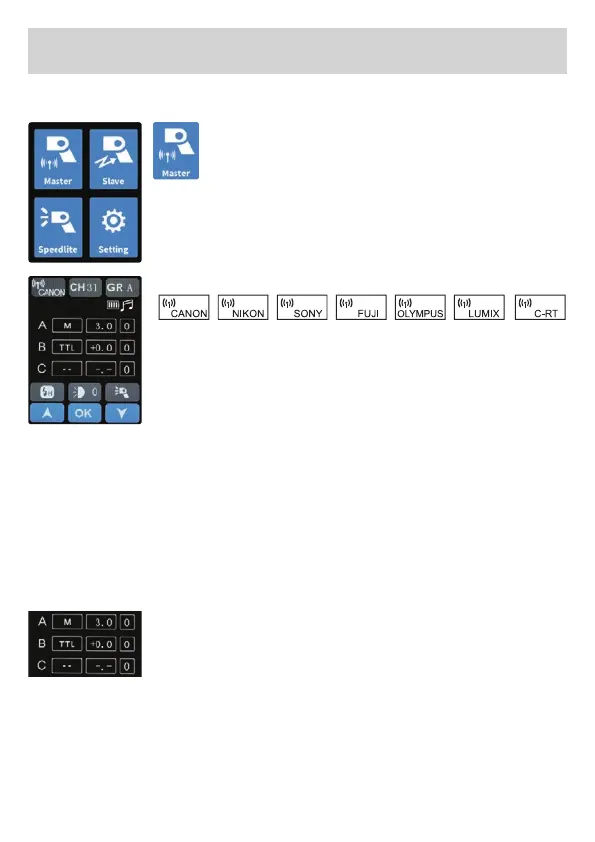
Wireless master mode
Tap the master symbol on the screen to enter
the wireless master mode interface.
Note: Master mode allows the HD-2 Max to
trigger other Jinbei ashes via 2.4 GHz. It then works
like a wireless trigger.
Selectable wireless modes
Wireless mode
Tap the wireless mode symbol on the screen, the
symbol turns to white, tap the wireless mode symbol
again or the up and down arrow symbols, to adjust
the wireless mode to keep consistent with the ca-
mera brand, and tap the OK symbol at the bottom of the screen to
conrm the setting.
Setting the ash head power in master mode: To adjust the power of
the pop-up ash in master mode, use group A. All settings made in
group A adjust the power of the pop-up ash.
CH: Channel can be chosen between 01 – 31, 31
devices can work at the same time without mutual
interference.
Tap the symbol on the screen to change the parameters, the symbol
will return to white, tap the symbol or the up and down arrow symbol
again, adjust to the required settings, and click the OK symbol at the
bottom of the screen to conrm the setting.


 To Next Page