36
Function Description
Slave ash beep:
The HD-2 Max is used as the main ash to
control the built-in beep of the slave ash.
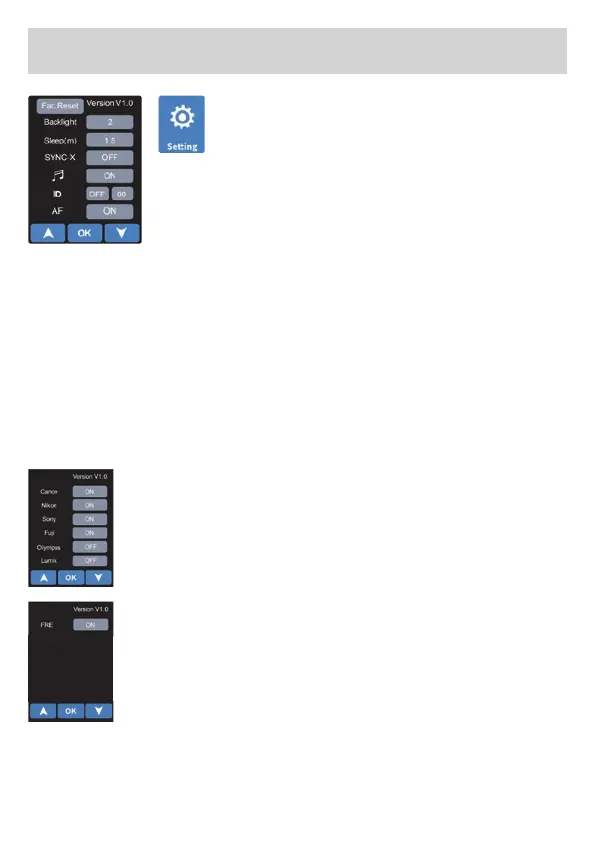
Canon C-RT wireless ”ID“
Touch the box to the right of the ”ID“ symbol on
the screen, highlight the selection box, touch the
selection box again or click the up and down arrow
symbols to set the Canon C-RT wireless function to ”ON“ or ”OFF“.
Click the valuebox on the right, click the up and down arrow symbols
to set the ID. The master and slave lights must be set to the same ID
to synchronize the ashing.
Factory Settings
Touch the ”Factory Setting“ symbol on the screen, press ”OK“ to con-
rm the resetting of the ash.
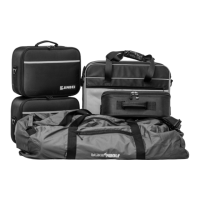
Camera manufacturer menu
In the settings, select the camera brands that are to
be available as options in the respective modes. You
activate the desired camera brands with ”On“ and
deactivate them with ”Off“.
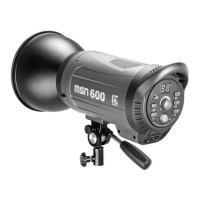
Freeze mode
If the freeze mode is activated, the corresponding sym-
bol also appears on the slave/speedlite mode page.
Note: Please note that the freeze symbol does not ap-
pear in master mode.
Freeze mode is automatically deactivated when High
Speed Synchronisation (HSS) is activated.


 To Next Page