37
Function Description
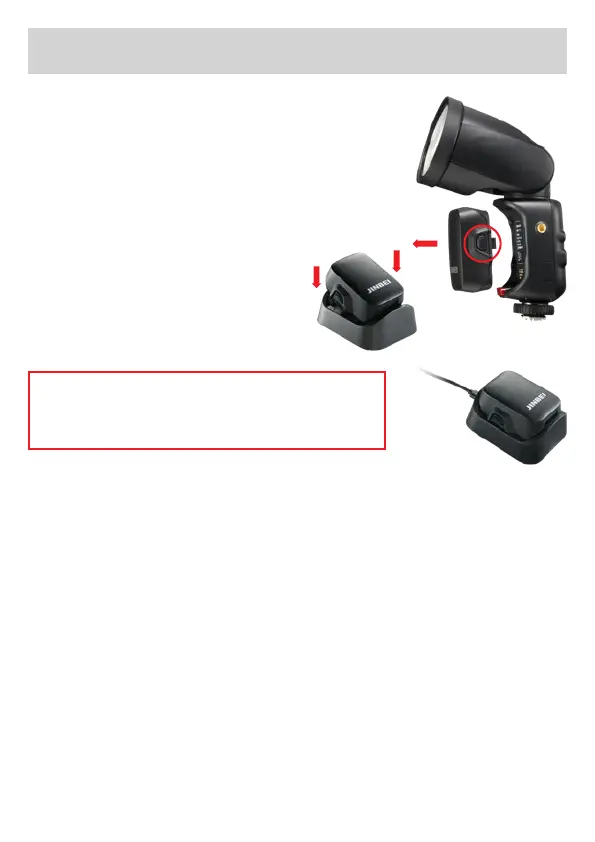
Lithium battery charging
1. Press the battery release key
and remove the battery.
2. Place the battery on the char-
ging station.
3. When the power cable is
connected to the mains power
supply, the red light indica-
tes that the charging is in
progress, and the green light
indicates that the battery is
fully charged.
Warning! Please do not continuously ash
with full power for a long time, otherwise it
will cause the HD-2 Max to overheat or age.
Description of continuous ash shooting
The temperature of the ash head may increase when the ash is
continuously red at full power for a short period of time. To avoid
deterioration or damage of the head due to overheating, the HD-2
Max will automatically activate the overheat protection and limit the
recycling time. During the limited period, the ”OH“ overheat symbol
is displayed, and the recycling time is automatically set to about 3
seconds (yellow ”OH“) and about 5 seconds (red ”OH“).
Firmware update
1. Connect the ash to the computer using the supplied USB-C cable.
2. Once the ash appears on the computer, copy the rmware to it.
3. Remove the cable when the copying process is complete.


 To Next Page