7 Interfaces and Product Label
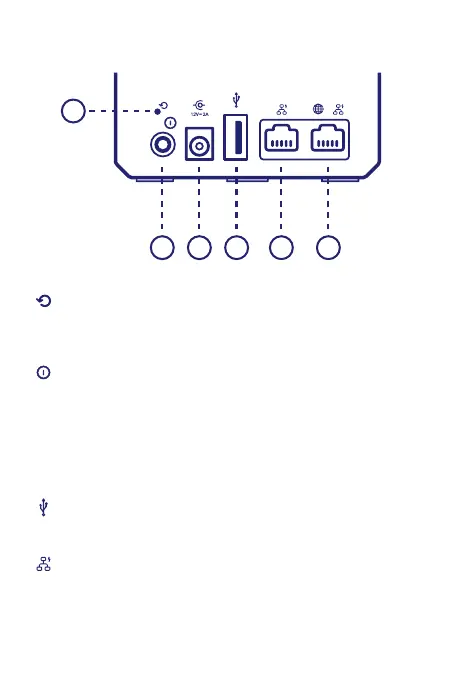
Reset button (item A):
When the JioExtender6 is powered on and you press the Reset you can
restart or reset it.
Power button (item B):
The power button allows you to power the JioExtender6 on or o.
Power port (item C):
The power port allows you to connect the power supply.
Warning: Only use the power supply delivered with your JioExtender6.
USB port (item D):
The USB port (optional) is reserved for future use.
Ethernet LAN port (item E):
The Ethernet LAN port allows you to connect your JioExtender6 to the
JioFiber homeGateway. If free, you can also use it as a second Ethernet
LAN port.
A
B C D E F


 To Next Page
 Loading...