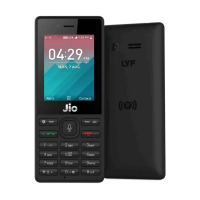
Your Jio SIM empowers you with True 4G
experience everywhere you go. You can make
voice calls in HD, enjoy high speed Internet
and get access to a secure mobile wallet, TV
channels, movies, songs, news, and
magazines and secure cloud storage, all on
the JioPhone.
1 Subscribe to Jio services
To subscribe to Jio services, visit the nearest
Jio Store to purchase the JioPhone.
Remember to carry the following documents
with you: Aadhar Card or Proofs of identity &
address, Passport size colour photograph
4 About your Jio SIM
Extending Battery life
Turn off radio services, i.e. Wi-Fi, Bluetooth,
GPS, if not required.
Due to non-usage of the phone for prolonged
duration, battery may be drained out. Allow
battery to be charged for at least 30-40
minutes. If the battery still does not reflect any
charge, then please visit the nearest Device
Care Center.
d) Lock or unlock your phone
Use keypad lock to avoid pressing the keys by
mistake. When the JioPhone keypad is
unlocked, long press * button to lock the
keypad. When the JioPhone keypad is locked,
long press * button to unlock the keypad.


 To Next Page