7
OPERATION
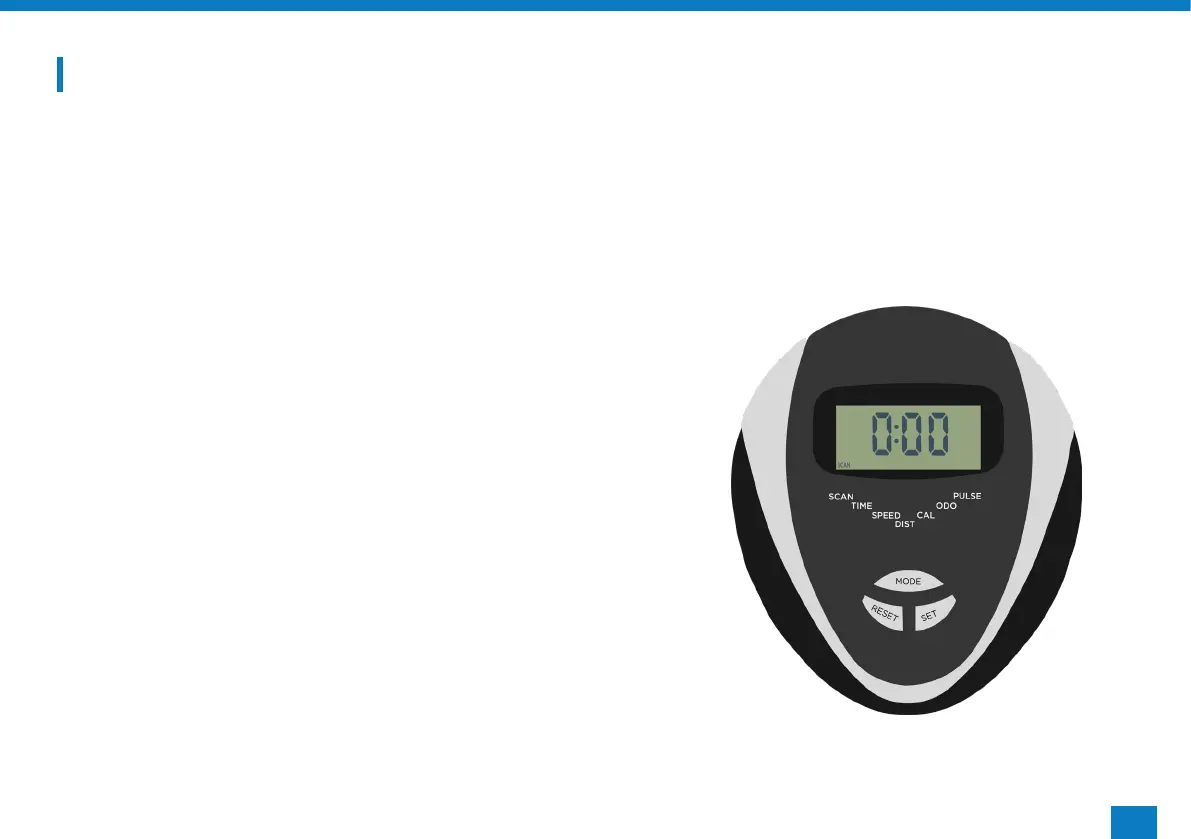
The JF100 monitor has a total of 6 readouts, displaying:
Time Speed Distance Heart Rate Calories Odometer
When rst powered on, the monitor will automatically be in ‘Scan’ mode. This means the digits in the largest segment
on the screen will change every few seconds between time, distance, speed etc. This will allow you to have an overview
while training without pressing any buttons.
SETTING TARGET PROGRAMS
On this monitor your are able to set a target time, distance, pulse
and calories.
• Start by pressing ‘MODE’ until your chosen setting ashes.
• Then press ‘SET’ to change the digits to your desired target.
• Once set, begin your workout by pedalling and you will see the
digits begin to change.
EXITING SCAN MODE
Press ‘MODE’ to exit scan mode and continuously press it to view
each readout. If you are within scan mode, there will be a scan icon
in the bottom left to indicate this.
RESETTING YOUR MONITOR
Press and hold the ‘RESET’ button until all the digits come up and
return to zero,



 To Next Page