Interfaces
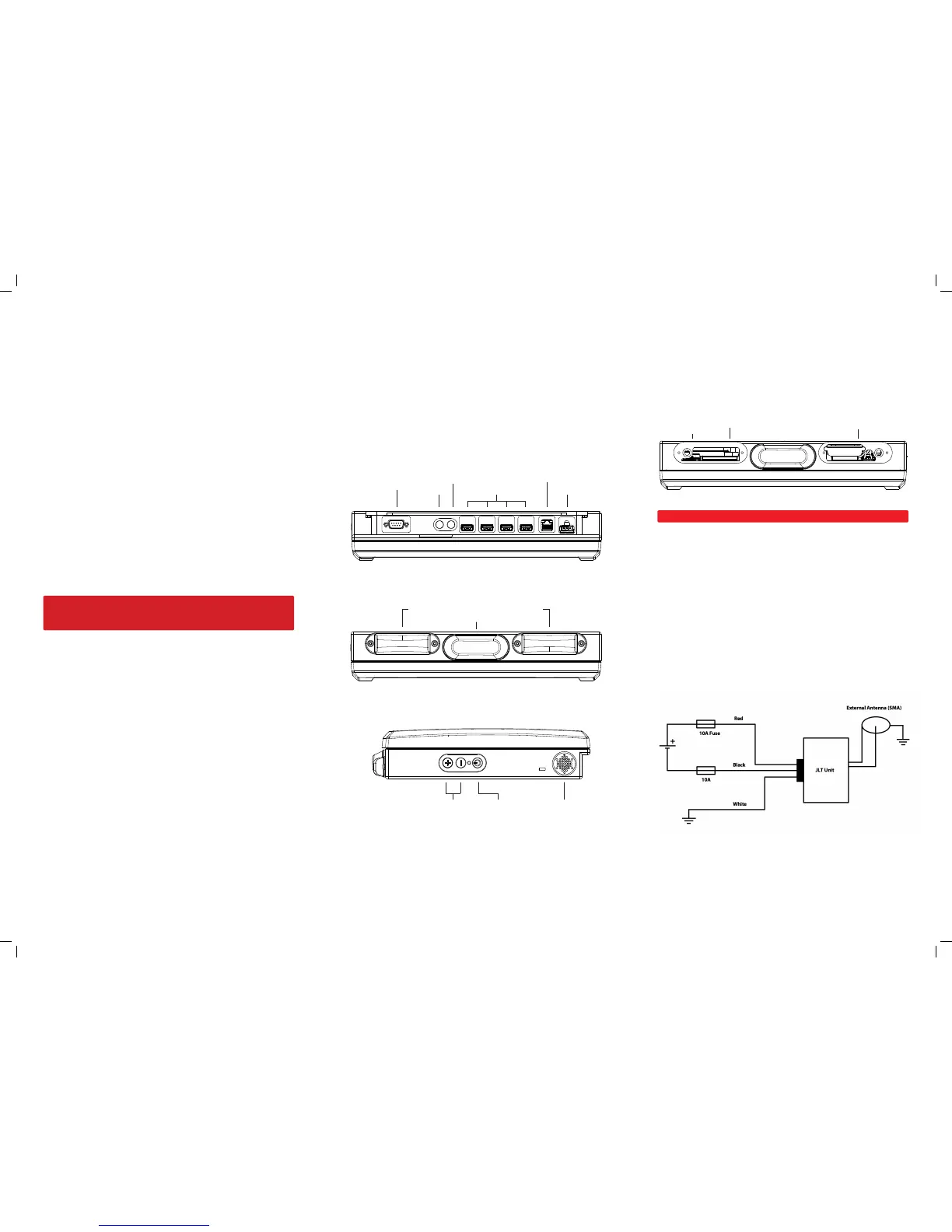
WAN / GPS Connectors (Optional SMA Connectors)
• When the unit is equipped with GPS, the SMA-connector has 3V output from
the unit. An ACTIVE antenna with built-in amplier must be used.
• When the unit is equipped with WAN (3G/UMTS/HSDPA+) the SMA-connector is
intended for a passive antenna. (Available from JLT)
VERSO 12 (med tangentlinjer & med Sierra GPS))
VERSO 12 (utan tangentlinjer & med Sierra GPS)
Display brightness
control
Power button Speaker
VERSO 12 (med tangentlinjer & med Sierra GPS))
VERSO 12 (utan tangentlinjer & med Sierra GPS)
RS232C (+12V Pin 9)
GPS
(Optional)
WAN
(Optional)
PowerUSB 2.0
RJ - 45 10/100/1000
VERSO 12 (med tangentlinjer & med Sierra GPS))
VERSO 12 (utan tangentlinjer & med Sierra GPS)
WLAN 802.11 a/b/g/n, 2.4/5Ghz, Integrated Antenna Dome
Bluetooth 2.0+ EDR Class 1
User Replaceable
Before removal of any lid, shut down computer and disconnect power cord.
Battery: UPS function, use Torx T10 screwdriver
Dimming screen after 10 seconds
Sleep signal after 1 minute, soft power down after 10 minutes. (Default OS settings).
Boot Media: CFast, use Torx T10 screwdriver.
Mini SIM-card slot for the WAN module.
VERSO 12 (med tangentlinjer & med Sierra GPS))
VERSO 12 (utan tangentlinjer & med Sierra GPS)
Mini SIM-card slot
Boot Media
Battery
Power Input
Conguration dependent:
2x 10A Fuse for 9-36 VDC, unisolated
Touch Screen
First Startup
On rst startup of a JLT Unit with a JLT OS image preloaded, Windows Setup starts.
Do not shut down the unit until the setup is done, otherwise the image may be
corrupt.
If the system already has been corrupted, a disk restore can be made from a JLT OS
image, contact your supplier for more information.
Note
If your supplier is providing a specic customer image, this step may be skipped.
After windows setup is done, please calibrate the touchscreen when the OS is
launched. Start menu – Program – UPDD – Calibrate
Press all calibration points.
With very excessive usage and in dirty environments, the usage of a protective lm is
recommended to prolong lifetime of touchscreen panel surface. (Available from JLT)
Do not use any other objects than ngers or stylus pointers intended for
touch screens. Regular pens, screwdrivers or any other not intended objects
may permanently damage the touch screen surface.
Touch screen can be cleaned with a damp cloth, ordinary hand dishwashing uids
may also be used.


 To Previous Page
 Loading...