Need help?
Do you have a question about the jobmate JMCDT218W and is the answer not in the manual?
Keep work area clean, well-lit, and away from children and distractions.
Match plugs, avoid body contact with earthed surfaces, protect from rain/wet.
Stay alert, use PPE, prevent unintentional starting, dress properly.
Do not force, check switch, disconnect power, store properly.
Follow charging steps, protect from moisture/heat, use correct supply, respect polarity.
Use correct battery, do not charge leaking/unauthorized types, keep out of reach.
Do not dismantle, short-circuit, expose to heat/shock. Keep clean, dispose properly.
Charge before use, use specified charger, do not charge unattended.
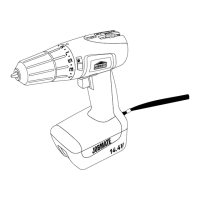
Identifies parts 1-9 of the drill.
Lists available accessories like battery packs and bits.
Specifies the tool's purpose for driving screws and drilling.
Covers removal, installation, and safety for battery packs.
Explains using the on/off switch and switch lock.
Instructions for charging the battery pack using the provided charger.
Explains the meaning of the indicator lights for charging status.
How to change rotation direction for drilling and screw driving.
Selecting between low (LO) and high (HI) speeds for different tasks.
Steps to open, insert bit, and secure the drill bit in the chuck.
Guide to setting torque for various screw sizes and materials.
Using the lock for manual screwdriver functions or final tightening.
How to activate the LED light for improved visibility.
Using center punch, applying pressure, and selecting correct bits.
Check if the forward/reverse control is in the lock position.
Adjust torque setting to a higher position for better results.
Wipe with dry cloth, keep vents clean, store in dry place.
 General
| Model | JMCDT218W |
|---|---|
| Category | Drill |
| Voltage | 18V |
| Variable Speed | Yes |
| Power Source | Cordless |
| No Load Speed | 0-550 RPM |
| Chuck Size | 13mm |
| Battery Type | Li-ion |
| Max Drilling Capacity (Wood) | 38mm |
| Max Drilling Capacity (Steel) | 10mm |

 To Next Page