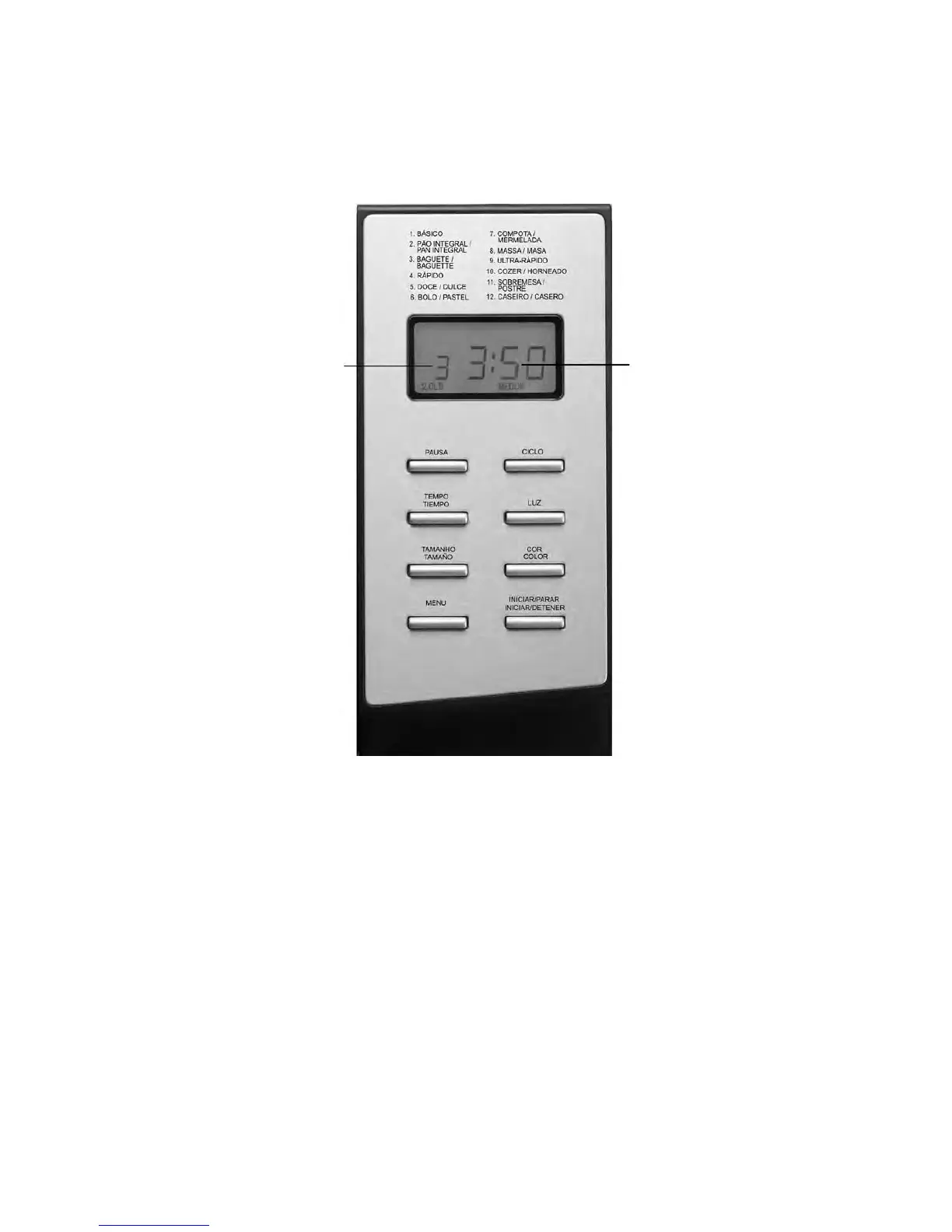
INTRODUCTION OF CONTROL PANEL
(The silkscreen is subject to change without prior notice.)
AFTER POWER-UP
As soon as the bread maker is plugged the power supply, a beep will be heard and “1 3:00 ”
appears in the display. But the two dots between the “3” and “00” don’t flash constantly. The
“1” is the default program. 1000g and MEDIUM will appear on LCD. They are default setting.
START/STOP (INICIAR/PARAR)
Starting and stopping the selected baking program.
To start a program, press the “START/STOP” (INICIAR/PARAR) button for approx. 1.5
seconds. A short beep will be heard and the two dots in the time display begin to flash and the
program starts. Any other button is inactivated except the START/STOP (INICIAR/PARAR),
LIGHT (LUZ), and PAUSE (PAUSA)buttons after a program has begun.
To stop the program, press the “START/STOP” (INICIAR/PARAR) button for approx. 1.5
seconds, then a beep will be heard, it means that the program has been switched off.
- 36 -
This indicates the program
you have chosen.
The operation time for each
program.


 To Next Page