EasyManua.ls Logo

Johannus Studio 170 - User Manual

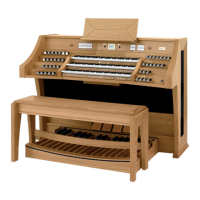
Johannus Studio 170
2 pages
Print Icon
To Next Page IconTo Next Page
Loading...
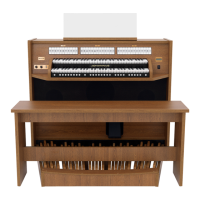
JOHANNUS Studio 170 Quick Reference Guide
Installation music desk:
- Turn countersunk brass screws into music desk slat by hand till screws stick out 2 mm.
- Place music desk at the right position, with screw points into the pre drilled holes.
- Tight music desk with screw driver. Electric screw driver is not recommended.
- Remove green protection foils from plexiglas part of the music desk.
Installation pedal board:
- Shift pedal board against black pedal front cover. Pedal bolts will stick out 5 mm
- For security reasons mount pedal board to organ with wing nuts.
Overview of controls:
A Pedal stops
B Swell stops
C Great stops
D Volume control organ
E Volume control cathedral
F Phones
G SET (programming capture system)
H Capture memory locations
I CH: Chorus
J Pre-programmed memory locations
K RO: Reeds Off
L Intonation styles
M Transposer
N - and + pistons
O ENTER
P MENU
Q 0: Recall / Reset
R Manual Great
S Manual Swell
T On/Off
U Display
Switch on:
Switch on the organ with the on/off piston at the right, next to the manuals. Wait several
seconds. Starting the control functions and the settings will take some time.
The lamps of the 0 piston and the as standard set functions light up. The settings appear on the
display.
Accessories:
Chorus (CH):
Chorus is a function for lightly detuning the organ stops to give it a broader and livelier sound.
Use the CH piston to activate the Chorus function.
Reeds Off (RO):
Reeds Off is a function to switch off all reeds simultaneously. As long as this piston is pressed, no
reeds can be activated. When this function is switched off, the reeds that were on are activated
again. Use the RO piston to activate the Reeds Off function.
Intonation styles (ROM), (SYM), (BAR) en (HIS):
The organ has four intonation styles:
Romantic (ROM), Symphonic (SYM), Baroque (BAR) and Historic (HIS).
Select an intonation style by pressing the ROM, SYM, BAR or HIS piston.
Transposer (TRANS.):
The Transposer function shifts the pitch by half-tone increments (from -8 to +8). The set pitch
can be read on the display (Tr:..).
- Press the TRANS. piston.
- Use the - and + pistons to set the pitch.
- When the transposer change needs to be saved, press the ENTER piston in the time the TRANS.
piston is lit.
Johannus Menu (MENU):
In the Johannus Menu several functions of the organ can be set.
Press the MENU piston to activate the Johannus Menu on the display.
Navigating the menu is done with the - and + pistons.
Confirmation of a choice is done with the ENTER piston.
Cancel or step back in the menu is done with the MENU piston.
Recall / Reset function (0):
The 0 piston cancels registration in two ways:
- A short press on the 0 piston: Only the last change is cancelled.
- A long press on the 0 piston: All registrations are cancelled.
Question and Answer IconNeed help?

Do you have a question about the Johannus Studio 170 and is the answer not in the manual?

Summary

Organ Controls and Features

Overview of Controls

Detailed list and description of physical and functional controls, including pedal stops, swell stops, volume controls, and display.

Switch On Procedure

Steps to power on the organ, including initial checks and display indicators like the 0 piston and standard set functions.

Chorus and Reeds Off Functions

Activating Chorus for a richer sound and Reeds Off to disable all reed stops simultaneously.

Intonation Styles and Transposer

Selecting sound profiles (Romantic, Symphonic, Baroque, Historic) and adjusting pitch with the Transposer.

Menu and Reset Functions

Accessing organ settings via the Johannus Menu and cancelling registrations with the Recall/Reset function.

Memory and Reverb Functions

Pre-programmed Memory Locations

Utilizing factory presets for various volume levels, from pianissimo to loud tutti.

Capture Memory System

Programming and recalling custom registrations across 75 levels and 8 memory locations per level.

Changing Reverb Settings

Adjusting reverb type, length, and 3D surround settings via the menu system.

External Connections and Volume Controls

External Connection Ports

Details on MIDI IN, MIDI MOD, MIDI SEQ, AUX IN, and AUX OUT ports for connecting external devices.

Headphone Connection

Information on connecting stereo headphones, specifying impedance requirements.

Volume Adjustments

Controlling the main organ volume and the Cathedral reverb volume.

Expression Pedal Function

Using the expression pedal to control Swell volume and timbre, simulating a pipe organ swell box.

Summary

Organ Controls and Features

Overview of Controls

Detailed list and description of physical and functional controls, including pedal stops, swell stops, volume controls, and display.

Switch On Procedure

Steps to power on the organ, including initial checks and display indicators like the 0 piston and standard set functions.

Chorus and Reeds Off Functions

Activating Chorus for a richer sound and Reeds Off to disable all reed stops simultaneously.

Intonation Styles and Transposer

Selecting sound profiles (Romantic, Symphonic, Baroque, Historic) and adjusting pitch with the Transposer.

Menu and Reset Functions

Accessing organ settings via the Johannus Menu and cancelling registrations with the Recall/Reset function.

Memory and Reverb Functions

Pre-programmed Memory Locations

Utilizing factory presets for various volume levels, from pianissimo to loud tutti.

Capture Memory System

Programming and recalling custom registrations across 75 levels and 8 memory locations per level.

Changing Reverb Settings

Adjusting reverb type, length, and 3D surround settings via the menu system.

External Connections and Volume Controls

External Connection Ports

Details on MIDI IN, MIDI MOD, MIDI SEQ, AUX IN, and AUX OUT ports for connecting external devices.

Headphone Connection

Information on connecting stereo headphones, specifying impedance requirements.

Volume Adjustments

Controlling the main organ volume and the Cathedral reverb volume.

Expression Pedal Function

Using the expression pedal to control Swell volume and timbre, simulating a pipe organ swell box.

Johannus Studio 170 Specifications

General IconGeneral
BrandJohannus
ModelStudio 170
CategoryMusical Instrument
LanguageEnglish

Related product manuals