Instruction manual
John Lewis Spectrum
wireless speaker
Instruction manual
John Lewis Spectrum
wireless speaker
10 11
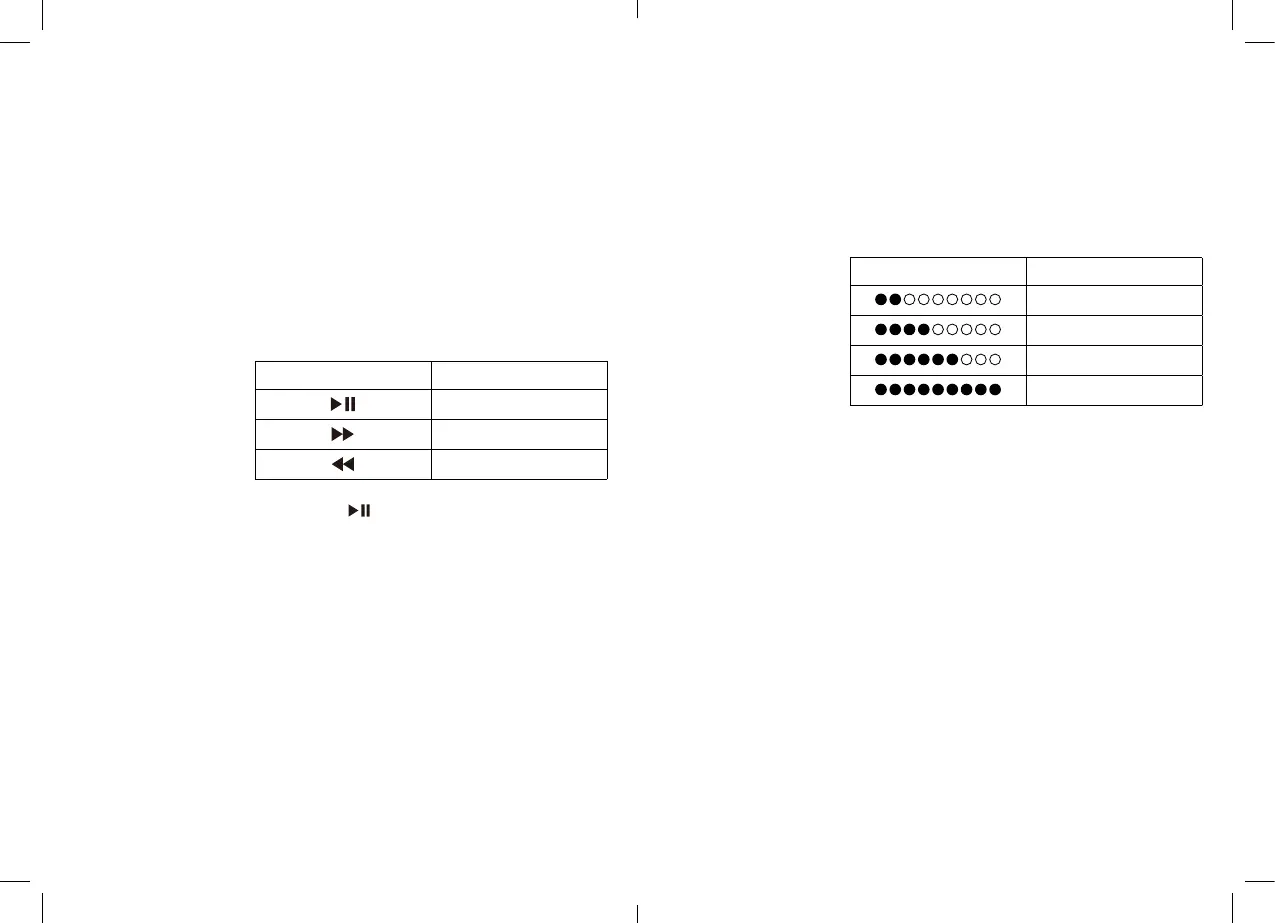
Battery indicator LED
and battery charging
The battery indicator LED shows the battery level.
Double-click the power button to view the display. The
indicator will turn off automatically after 30 seconds. A
warning will sound when the battery is low.
When the battery is low, please recharge your speaker.
Charge an external device
This speaker is equipped with a USB 5V/1A output to
charge external devices. Charge your mobile phone or
another device by connecting via a corresponding USB
cable.
Aux playback mode
Insert a 3.5mm cable into the Aux-in socket. The speaker
will automatically switch to Aux-in mode.
Power saving
This feature ensures the lowest possible energy use to
protect the internal battery. The speaker switches to
power-saving mode when it has been idle for more than
15 minutes. Press the volume button once to wake the
speaker.
Battery indicator
Charging percentage
0% - 25%
26% - 50%
51% - 75%
76% - 100%
Volume control
Rotate the volume dial to increase or decrease the
volume. The speaker will beep when it reaches
maximum volume.
Bluetooth pairing
Inpairingmode,theLEDindicatorwillashblueto
indicate that it is searching for previously paired devices
or is available for new connections. Enable Bluetooth on
your audio device and select “JLPWS02” from the list.
The LED indicator will show as solid blue once it has
connected.
Press and hold for 3 seconds to disconnect the
Bluetooth connection.
Hands-free phone calls
The unit allows you to take hands-free calls. Press the
“receive call” button to answer a call, or the “end call”
button to decline it.
Icon
Functions
Play/Pause
Forward
Backward


 To Next Page