The Johnson Controls Flush-Mounted NSA7000 Series Network Sensor is a sophisticated device designed for ambient temperature and humidity sensing, offering precise control and monitoring capabilities within building management systems. This sensor is intended for use as an operating control in various environments, providing critical data for maintaining optimal indoor conditions.
Function Description
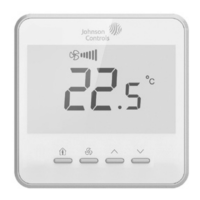
The NSA7000 sensor measures ambient temperature and, in specific models (NSA-FHR71X3-0), relative humidity. It features a clear LCD display that shows the current room temperature, set point temperature, or relative humidity, depending on the user's default display settings. The device allows users to adjust temperature set points and offers various operational modes, including an "Eco" mode indicated by a leaf symbol.
The sensor integrates into a network via a main network port, facilitating communication with other control devices. It supports multiple display languages (Chinese and English) and temperature units (°C or °F), making it adaptable to diverse user preferences and regional standards.
Key functions include:
- Temperature Sensing and Control: Provides accurate ambient temperature readings and allows users to set desired temperature set points. The set point adjustment type can be configured as an absolute set point or a relative offset (W/C).
- Humidity Sensing (NSA-FHR71X3-0 models): Measures and displays relative humidity, which can be enabled or disabled in the settings.
- Default Display Configuration: Users can choose what information is shown on the main screen by default: room temperature, set point temperature, or relative humidity (if available).
- Eco Mode: Features a "leaf symbol" to indicate an energy-saving mode. The cooling and heating trigger temperatures for activating this mode are configurable, allowing for customized energy optimization.
- Backlight Control: The display backlight can be set to dim after a specified period of inactivity (5 to 60 seconds), enhancing energy efficiency and user comfort.
- Keypad Lock: Offers different levels of keypad lock functionality: no lock, lock all keys, or lock all keys except the occupancy key, preventing unauthorized adjustments.
- Network Integration: Connects to a main network port, enabling seamless communication and data exchange with other Johnson Controls building management systems. The device has a configurable address (00-16, 199-215) for network identification.
Important Technical Specifications
- Dimensions: The front panel measures 87.75 mm x 87.75 mm. The depth of the device, including the mounting bracket, is 39.20 mm, with the visible portion extending 14.20 mm from the wall.
- Temperature Range:
- Maximum Operating Temperature: 45 °C (113 °F)
- Minimum Operating Temperature: -0 °C (-32 °F)
- Maximum Storage Temperature: 60 °C (140 °F)
- Minimum Storage Temperature: -10 °C (-14 °F)
- Humidity Range:
- Maximum Operating Humidity: 90% RH
- Minimum Operating Humidity: 10% RH
- Maximum Storage Humidity: 90% RH
- Minimum Storage Humidity: 10% RH
- Power Supply: 15V DC (via SA PWR and BUS COM pins).
- Network Connectivity: Utilizes a main network port with specific pin assignments for power, communication, and SA BUS (SA BUS + and SA BUS -). The pin assignments are:
- Pin 6: PWR (sensor)
- Pin 5: COM (sensor)
- Pin 4: PWR (tool)
- Pin 3: COM (tool)
- Pin 2: SA BUS +
- Pin 1: SA BUS -
- Installation Clearance: Requires a minimum clearance of >50 cm (19.68 inches) from the ceiling and >150 cm (59.05 inches) from the floor for optimal performance and accurate readings.
- Material Composition (RoHS Compliance): The product contains various components, with hazardous substances managed according to SJ/T11364 regulations.
- Plastic components: All hazardous substances are below the GB/T26572 limit.
- Circuit board and components: Lead (Pb) exceeds the GB/T26572 limit but is exempted under EU RoHS due to current technological limitations for substitution. Other hazardous substances are below the limit.
- Metal components: All hazardous substances are below the GB/T26572 limit.
Usage Features
- Intuitive User Interface: The sensor features a user-friendly interface with clear icons for temperature, fan speed, and auto mode. The display shows the current temperature prominently.
- Parameter Setup and Adjustment: Accessing the parameter list is straightforward: press the "Setup" button for 5 seconds. Navigate through settings using the "Up" and "Down" arrow buttons and adjust values with the "Enter" button.
- Customizable Settings: Users can personalize various aspects of the sensor's operation, including:
- Display language (Chinese, English)
- Temperature units (°C, °F)
- Network address
- Temperature set point adjustment type
- Humidity display (enable/disable)
- Default display content
- Leaf symbol (Eco mode) enable/disable
- Backlight timer
- Keypad lock options
- Cooling and heating trigger temperatures for Eco mode.
- Visual Feedback: The display provides immediate visual feedback on current settings and operational status, such as the "leaf symbol" for Eco mode and fan speed indicators.
Maintenance Features
- No User Repair: The NSA7000 sensor is not designed for field repair. In case of malfunction, users are instructed to contact their nearest Johnson Controls representative and provide the product code number for replacement. Attempting to repair the device or removing the PCB from the enclosure cover will void the product warranty.
- Installation Guidelines: Installation must be performed by qualified technicians in accordance with local, national, and regional regulations. It is crucial to disconnect the power supply before making electrical connections to prevent electric shock.
- Environmental Considerations: The sensor should not be installed in condensing, wet, or damp environments, as moisture can damage the device.
- Wiring Precautions: All wiring connections must adhere to specified electrical ratings. Unused wire leads must be insulated and secured before applying power to prevent property damage, electric shock, or severe personal injury.
- Grounding: The device must be properly grounded according to local and national regulations to prevent electric shock.
- Safety Warnings: The manual emphasizes critical safety warnings regarding electrical shock and property damage, underscoring the importance of proper installation and handling. Additional precautions, such as supervisory or alarm systems, should be integrated into the overall system to mitigate risks associated with sensor malfunction.
- LCD Plastic Cover: The LCD plastic cover must be removed before use to ensure proper display visibility.
The NSA7000 series network sensor is a reliable and versatile component for modern building automation, offering precise control and a user-friendly experience while adhering to stringent safety and environmental standards.

 Need help?
 General

 To Next Page