2
NSA7000 ENGLISH
INSTALLATION INSTRUCTIONS FOR THE TECHNICIAN/FITTER
READ THIS INSTRUCTION SHEET AND THE SAFETY WARNING CAREFULLY BEFORE INSTALLING AND
SAVE IT FOR FUTURE USE
REPAIR AND REPLACEMENT
Do not attempt to repair the NSA7000 sensor. In case of improperly functioning control, contact the nearest Johnson Controls
®
representative, and speci-fy the desired product code number. When contacting the supplier for a replacement please state the
type/model number of the control located on the data plate or cover label.
IMPORTANT:
• Use this NSA7000 sensor only as an operating control. Where failure of malfunction of the NSA7000 sensor could lead to personal
injury or proper-ty damage to the controlled equipment or other property, additional precautions must be designed into the system.
Incorporate and maintain other devices such as supervisory or alarm systems or safety or limit controls intended to warn of, or
protect against, failure or malfunction of the NSA7000 sensor.
• Do not install this sensor in condensing, wet, or damp environment. Moisture may cause damage to the sensor.
• Do not remove PCB from the enclosure cover. Removing the PCB from the enclosure cover voids the product warranty.
• Make all wiring connection in accordance with local, nation, and regional regulations. Do not exceed the NSA7000 sensor
electrical ratings.
• Remove LCD plastic cover before use.
WARNING:
Disconnect power supply before making electrical connections. Contact with components carrying hazardous voltages can cause
electrical shock and may result in severe personal injury or death.
• Risk of Electrical Shock:
Ground the device according to local, national, and regional regulations. Failure to ground the device
may result in electri-cal shock and severe personal injury and death.
• Risk of Electrical Shock and Property Damage:
Insulate and secure each unused wire lead before applying power to the
device. Failure to insulate and secure each unused wire lead may result property damage, electrical shock, and severe personal
injury or death.
Setup and adjustment:
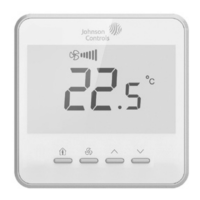
Press button for 5 seconds, to get in parameter list, press button to switch over setting items and use
∧
and
∨
button
to change parameter value.
Item Parameter Function Default
01 Display language 00:
中文
; 01: English 00
02 Units 00:
℃
; 01:
o
F 00
03 Address 00-16(199-215) 00
04 Temperature set point adjustment type 00=Set point; 01=W/C 00
05
Humidity display
(only for NSA-FHR71X3-0)
00: enable
01: disable
00
06 Default display
00: room temperature
01: set point temperature
02: relative humidity
(only when Humidity display is available)
00
07 Leaf symbol 00: enable; 01: disable 00
08 Backlight time 05~60, reduce backlight after xx seconds 30
09 Keypad Lock
00: No lock
01: lock all keys
02: lock the key except occupancy
00
10 Cooling trigger for leaf 24~32
℃
26
℃
11 Heating trigger for leaf 18~26
℃
20
℃


 To Next Page
 Loading...