901-10113 - 25 - 9/16/2024
4.2 Fault Conditions
This section introduces what the user will see if a system fault occurs.
Table 4: Instructions for fault conditions
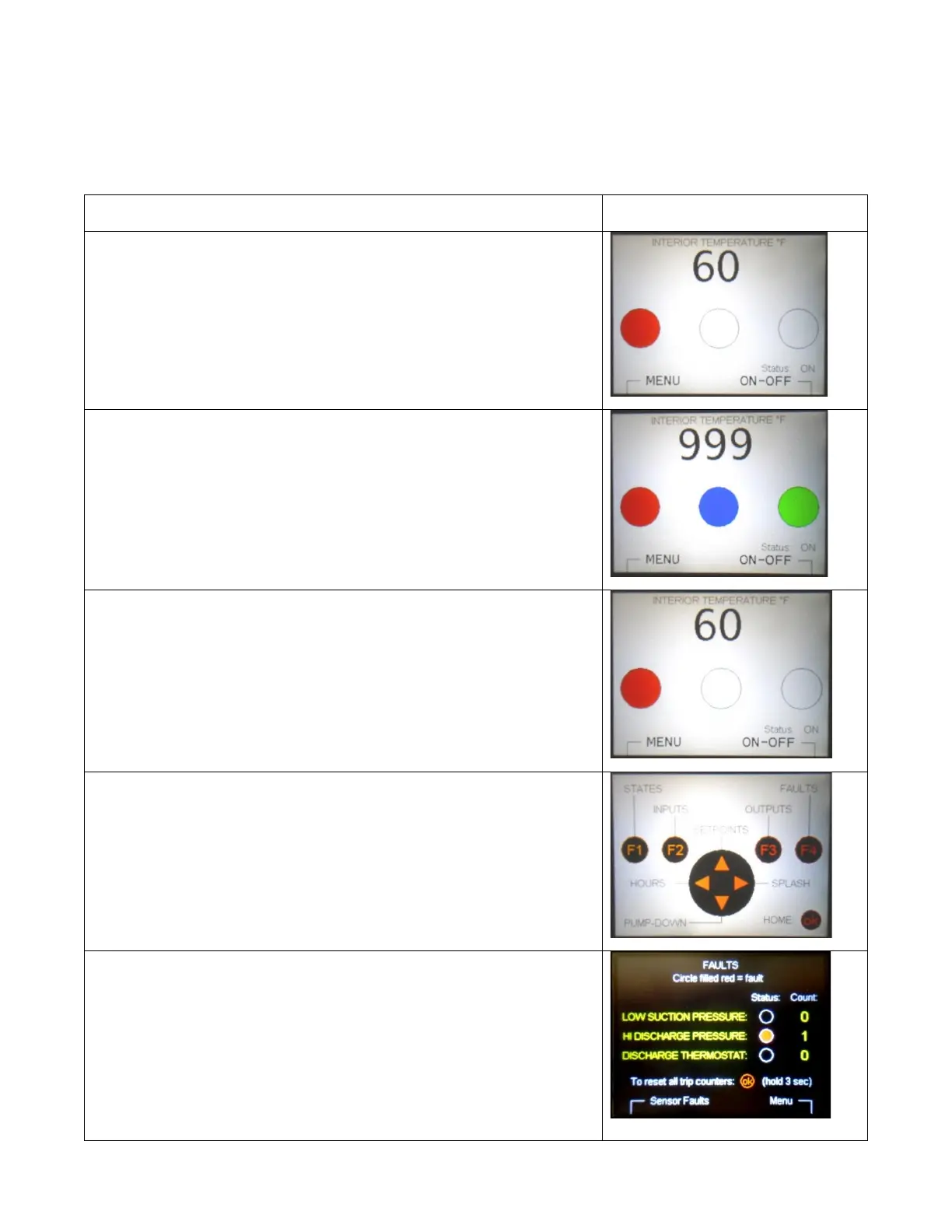
A flashing red indicator shows that a fault is present.
Most faults prevent the compressor from running and cooling the
truck. This protects the system from serious damage or hazards
due to dangerous pressures or temperatures.
Some faults still permit cooling, because there is no immediate
hazard.
In the pictured example, the Interior Temperature sensor or its
cable has been damaged. The compressor is primarily controlled
based on refrigerant pressures, so only the temperature display
is affected. The compressor is still running.
Information about the fault can be accessed with the User
Interface.
Begin by navigating to the MENU. The HOME screen shows that
the MENU is reached by pressing the F1 Button
At the MENU Screen, the F4 button navigates to the FAULTS
screen.
The FAULTS screen shows which fault(s) is currently occurring,
and the number of times that each fault has occurred.
In this case, high discharge pressure could be due to a
combination of dirty/blocked condenser coil and very hot
weather.
See the troubleshooting guide for more help with faults.



 To Next Page