Need help?
Do you have a question about the Johnson J8 and is the answer not in the manual?
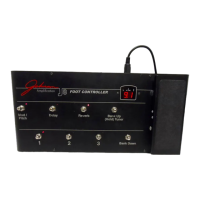
Switches for preset selection, bank navigation, and tuner activation.
Pedal for parameter control and display showing status and notes.
Switches to toggle Mod/Pitch, Delay, and Reverb effects on/off.
Features the 5-pin DIN jack for amplifier connection.
Step-by-step instructions for connecting the J8 to the Johnson amplifier.
Overview of how footswitches access amplifier functions.
Operation of bank advancement, tuner activation, and note indication.
How to use numbered switches for presets and effect switches for effects.
Details real-time control of parameters, volume, and wah pedal functionality.
 General
| Brand | Johnson |
|---|---|
| Model | J8 |
| Category | Accessories |
| Language | English |

 To Next Page