15
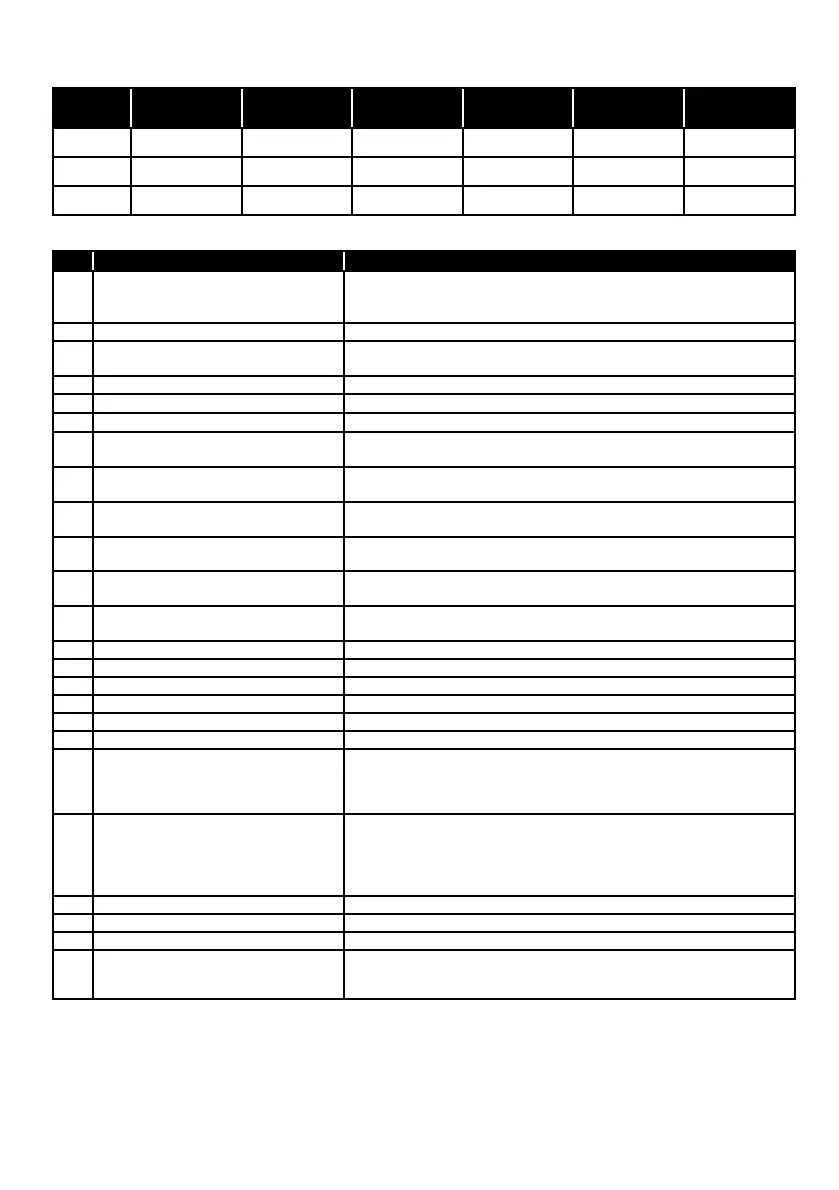
Power LED mode table
DDC/CI command table
mode AC off
In signal
inputting
In signal
search
No signal DC off
In changing
input
On1 OFF Green Green Green OFF Green
On2 OFF OFF Green Green Red Green
Off OFF OFF OFF OFF OFF OFF
Code
Code name Descripition
02h New Control Value
This VCP code is used to determine if a display control has been
used, this control allows for the synchronization of display
hardware/firmware and asoftware utility.
04h Restore Factory Defaults Restores all factory presets, including brightness / contrast.
05h
Restore Factory Luminance/
Contrast Defaults
Resets the geometry adjustment (screen size / position) to the
factory default.
08h Restore Factory Color Defaults Restore color settings to factory defaults
10h Brightness Increasing this value will increase the brightness of the image.
12h Black Level Increasing this value will increase the contrast of the image.
14h Select Color Preset
Color temperature setting
(04:5500K,05:6500K,06:7500K,0B:USER1)
16h Video Gain (Drive): Red
Increasing this value will increase the brightness of red pixels.
*The value is saved only if preset is USER.
18h Video Gain (Drive): Green
Increasing this value will increase the brightness of green pixels.
*The value is saved only if preset is USER.
1Ah Video Gain (Drive): Blue
Increasing this value will increase the brightness of blue pixels.
*The value is saved only if preset is USER.
52h Active Control
It is used in conjunction with 02h to maintain synchronization
when changing settings.
60h Input Select
Input select(0Fh:Displayport1,11:Digital
12:Digital video (TMDS) 4 HDMI2)
62h Audio: Speaker Volume Adjust the volume
8Dh Audio: Mute Mute or unmute.
ACh Horizontal Frequency Reading horizontal frequency
AEh Vertical Frequency
Reading vertical frequency
B6h Display Technology Type Read the type of display.
C0h Display Usage Time Returns the current value (in hours) for the term of turning on
C6h Application Enable Key
A two-byte value used to allow the application to work only with
known products. The display manufacturer and the application
author agree with the code so that the application should only
run if valid code is present on the display.
C8h Display Controller ID
This VCP code provides the host with knowledge about the
controller manufacturer and unique chip ID used on a particular
display. This information allows hosts to use a table-based
approach (depending on the application) to identify chip-specific
features and limitations that may apply to connected displays.
CAh OSD Locks or unlocks the OSD button.
CCh OSD Language Select OSD language
D6h Power Mode
Power ON or OFF is available.
DFh VCP Version
Defines the MCCS standard version number recognized by the
display. SH bytes: defines the MCCS version number. SL bytes:
defines the MCCS revision number.


 To Next Page