8
2.3 Assembly, connection and other connections
Take the included items out of the box.
Waring
It contains heavy objects, so be careful not to drop it or hit it when removing it.
1
3
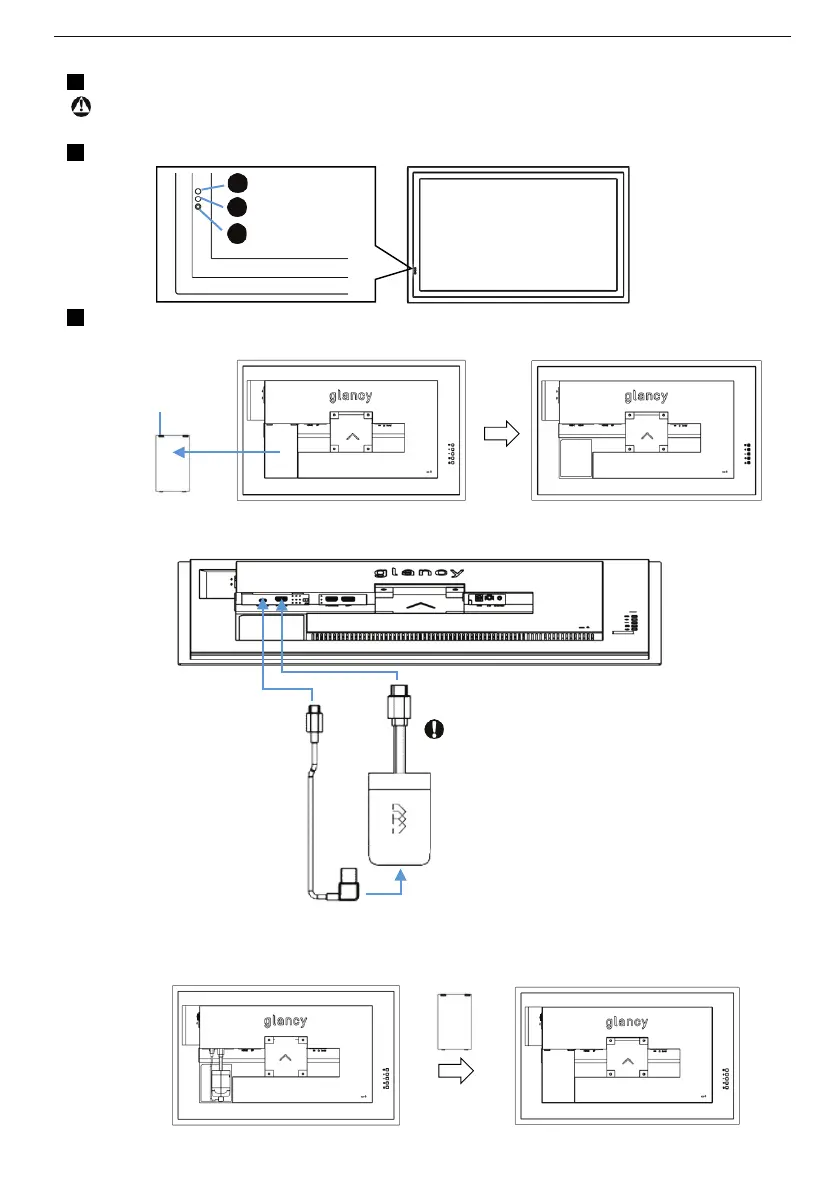
(Back)Connect the dongle and USB drive to the monitor.
①Remove the dongle cover on the back.
Press the cover
closure to remove
the dongle cover.
②Connect the dongle to the monitor.
Connect the
USB-OTG cable
to the USB-C
terminal of the
monitor.
③Put back the dongle cover
Connect the USB-OTG
cable to the USB-micro
terminal of the dongle.
Connect the tip of the
dongle to HDMI1.
Do not connect the
dongle to anything other
than this monitor.
1
2
3
2
Power LED
Remote control
receiver
Luminance
sensor
(Front)LED and Sensor light receiving part.


 To Next Page