EasyManua.ls Logo

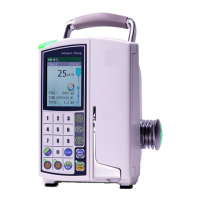
Jorvet Vet Pro Pump User Manual

Default Icon
2 pages
To Next Page IconTo Next Page
Page #1 background imageLoading...
Page #1 background image
1. Turn pump ON
2. Press INFO key twice
3. Scroll down with the down- arrow key (0)
to ADJUST SETTINGS.
4. Press START/OK key.
5. Scroll down with the down- arrow key (0)
to MORE.
6. Press START/OK.
7. Using the numeric key pad, input Technician
Code 901
8. Press START/OK key.
9. Scroll down with the down- arrow key (0)
to MAXIMAL RATE.
10. Press START/OK.
11. Input 1200 ml.
12. Press START/OK key.
13. Scroll down with arrow
keys (2, 0) to
RESTART PUMP. Confirm by
pressing START /OK.
Issue: Pump will not rate entry above 500 ml/ hr
A small numeral 3 will be displayed on the upper
right-hand corner of the LCD Display when the Factory
Defaults have been changed.
Solution: Reset factory default Maximal Rate. The Vet
Pro Pump comes with a factory default Maximal Rate of
500ml.
Maintenance & Troubleshooting
Question and Answer IconNeed help?

Do you have a question about the Jorvet Vet Pro Pump and is the answer not in the manual?

Jorvet Vet Pro Pump Specifications

General IconGeneral
TypeVeterinary Infusion Pump
Flow Rate Increment0.1 mL/hr
Accuracy±5%
Battery Life4 hours
DisplayLCD
Target SpeciesVeterinary
UsageIntravenous fluid delivery
Occlusion PressureAdjustable; High, Medium, Low
AlarmsOcclusion, Air-in-line, Low battery
Power SourceAC Adapter or Rechargeable Battery
WeightApproximately 1.5 kg

Summary

Troubleshooting Pump Rate Entry

Resetting Maximal Rate

Procedure to reset the pump's factory default maximal rate by entering technician code 901 and restarting the pump.

Troubleshooting Pump Errors

AIR Error Resolution

Clean air sensors with an applicator and alcohol; try a new IV set or contact support.

Pump Charging Issues

Check A/C icon, try another cord, or verify battery age/condition; contact support if unresolved.

Related product manuals