C3i-M
4 - 8
4.7. KEYBOARD REPLACEMENT
- Open the front panel and disconnect the keyboard.
- Unstick and remove the keyboard.
- Clean the plastic mounting
- Fit a new keyboard. Press firmly across the whole surface to ensure adhesion.
4.8. GAS SPRING REPLACEMENT
4.8.1. GAS SPRING REPLACEMENT ON THE C3i
The gas spring appears on the figure 2.3, item 8 (chapter 2). For its replacement follow the C3i motor
replacement procedure (4.1.1).
- Follow motor replacement procedure from step 1 to 4 (included).
- Remove the 4 screws that fix the rack to the machine, then disconnect and remove the rack.
- Now only the foot of the gas spring remains screwed.
- Remove the screw and then remove the gas spring.
4.6.2. DISPLAY BOARD
Dismounting
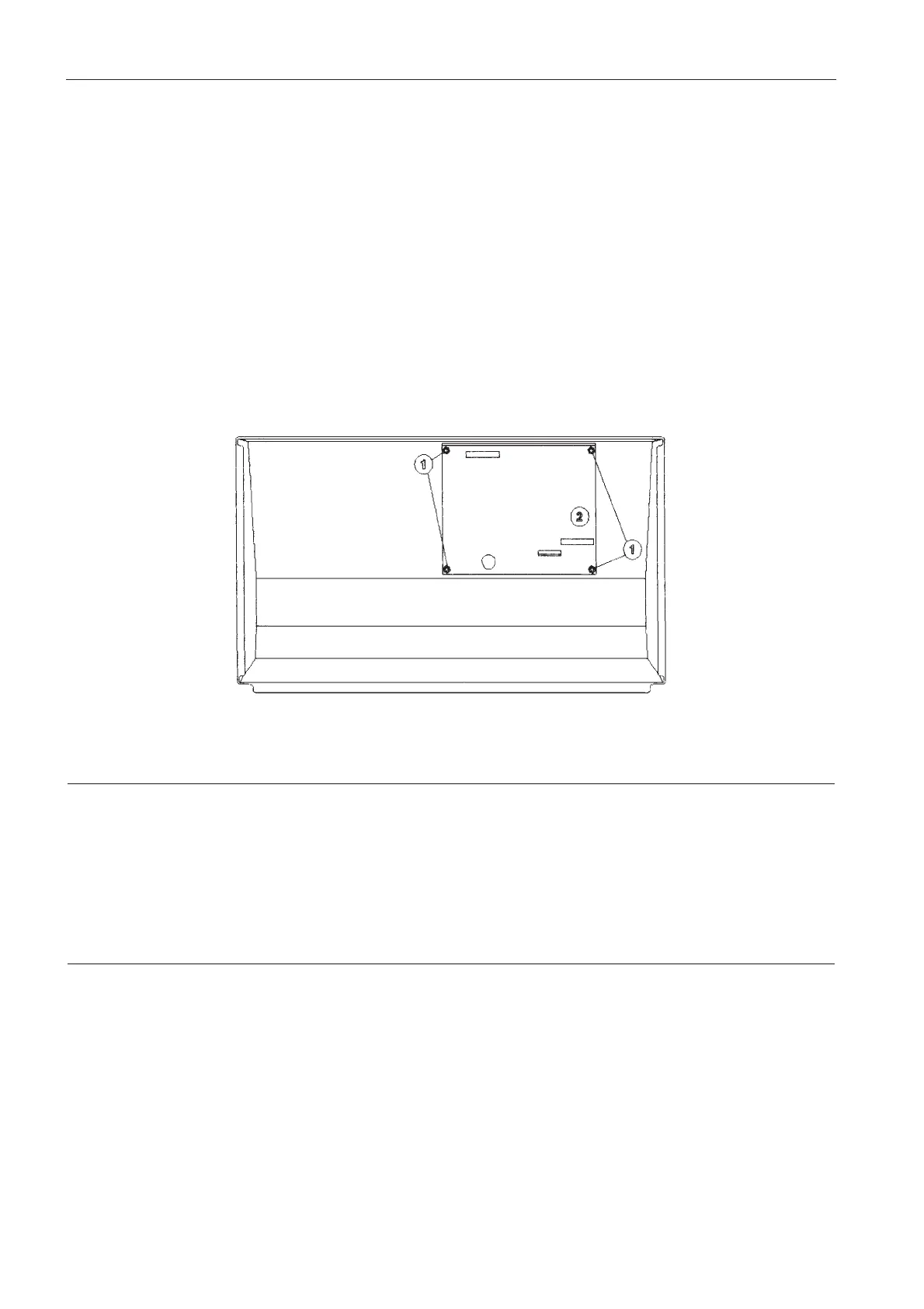
- The board is located behind the front panel; the latter has to be removed by unscrewing the five press
screws and by disconnecting the power switch, the flat cable, the display supply and the front panel
ground cable.
- Unscrew the four holding nuts (1) and remove the board (2).
Refitting
- Carry out the above operations in the reverse order.


 To Next Page