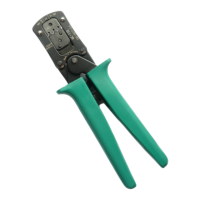
The JST Crimp Tool, model CS 10 - WC 240, is a specialized hand tool designed for the precise processing of JST contacts, specifically the SPH-002-PO.5S series. This manual provides comprehensive instructions for its operation, ensuring proper crimping and reliable connections for electrical applications.
Function Description:
The primary function of the JST Crimp Tool is to securely attach JST contacts to wires by deforming the contact around the wire's conductor and insulation. This process, known as crimping, creates a gas-tight electrical connection that is mechanically strong and resistant to environmental factors. The tool is engineered to provide consistent and repeatable crimps, which is crucial for maintaining the integrity and performance of electrical circuits. It features a ratcheting mechanism that ensures the crimp cycle is completed before the tool can be opened, preventing partial crimps and ensuring optimal connection quality. The integrated flap locator and positioner guide the contact and wire into the correct crimping position, minimizing errors and maximizing efficiency.
Important Technical Specifications:
- Model: CS 10 - WC 240
- Compatible Contacts: JST SPH-002-PO.5S
- Wire Gauge Compatibility:
- Crimping Profiles: The tool features multiple crimping profiles tailored to different wire gauges, ensuring an optimal crimp for each specified AWG range. These profiles are clearly marked on the tool's jaws.
- Ratcheting Mechanism: Ensures a full crimp cycle for every operation, enhancing reliability and preventing incomplete crimps.
- Flap Locator/Positioner: Guides the contact into the correct position within the crimping die, ensuring precise alignment.
- Insulation Stop Blade: Facilitates proper wire insertion depth, ensuring the insulation is crimped correctly without interfering with the conductor crimp.
Usage Features:
The JST Crimp Tool is designed for ease of use and precision, incorporating several features to streamline the crimping process:
- Opening the Tool: The first step in using the tool is to open its jaws completely. This prepares the tool for contact insertion.
- Loosening the Flap Locator: The flap locator, a movable component that guides the contact, needs to be loosened or "clicked out" to allow for contact placement. This is achieved by pushing it outwards, making it ready to receive the contact.
- Inserting the Contact: The JST contact (e.g., SPH-002-PO.5S) is then inserted into the designated crimping profile. It is crucial to ensure the contact lies in the center of the respective profile and is pushed in until it reaches the stop. The manual emphasizes paying attention to the correct cross-section (wire gauge) for the chosen profile.
- Closing the Flap Locator: Once the contact is correctly positioned, the flap locator is closed or "swung back" into place. This secures the contact in the crimping die and ensures proper alignment during the crimping process.
- Lightly Closing the Tool (Ratchet Engagement): The tool is then closed lightly until the contact is held securely by the ratcheting mechanism. This initial engagement prevents the contact from shifting while the wire is inserted. The ratcheting action ensures that the tool will not release the contact until the full crimp cycle is completed.
- Inserting the Cable: The stripped end of the wire is inserted into the contact until it reaches the insulation stop blade. This ensures that the conductor is fully within the crimping area and the insulation is positioned correctly for the insulation crimp.
- Completing the Crimp: The tool is then fully closed, engaging the ratcheting mechanism through its complete cycle. This action crimps both the conductor and the insulation of the wire to the contact.
- Removing the Crimped Contact: After the full crimp cycle is completed, the tool automatically releases, allowing the user to remove the securely crimped contact.
The tool's design, with its clear markings for wire gauges (AWG 30-28, AWG 26, AWG 24) and the integrated positioner, helps users select the correct crimping profile and ensures consistent results. The ergonomic design of the handles provides a comfortable grip, reducing user fatigue during repetitive tasks.
Maintenance Features:
While the manual does not explicitly detail maintenance procedures, the robust construction of the JST Crimp Tool suggests a design intended for durability and long-term performance. General maintenance practices for such tools typically include:
- Regular Cleaning: Keeping the crimping dies free from debris, insulation fragments, and other contaminants is essential for consistent crimp quality. A soft brush or compressed air can be used for this purpose.
- Lubrication: Periodically lubricating the pivot points and ratcheting mechanism with a light machine oil can ensure smooth operation and prevent wear.
- Inspection: Regularly inspecting the crimping dies for wear, damage, or misalignment is crucial. Worn or damaged dies can lead to poor crimps and should be addressed promptly.
- Storage: Storing the tool in a clean, dry environment protects it from rust and damage, extending its lifespan.
The JST Crimp Tool CS 10 - WC 240 is a professional-grade instrument vital for anyone working with JST SPH-002-PO.5S contacts, offering precision, reliability, and ease of use for creating high-quality electrical connections.

 Need help?
 General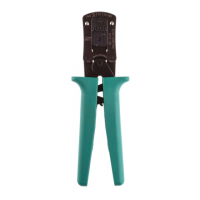

 To Next Page