EN
29
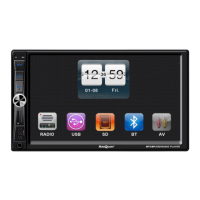
MEN
Switches between menu and
standard display.
RST
Reset. If the car stereo is not
working properly this can be used
to reset it.
POW/VOL
Starts the car stereo. Press the
button to switch o the main unit.
Function selection when the car
stereo is on. Press once to adjust
the volume. Press twice for DSP,
where base (BAS) and treble (TRE)
can be changed. Press again for
SOUND, where the balance (BAL)
of the speakers can be adjusted.
Press three times to go to DISPLAY,
where the screen brightness and
colour can be changed. This only
works in playback mode, not in
radio mode. After selecting mode,
turn the button or press the
screen to set.
Adjusts the volume.
SD SD card slot
USB USB port.
FIG. 1
Remote control
Pos. Function
1 PWR
Starts/switches o the car
stereo.
2 MODE
Switches function mode.
Connects phone call in
Bluetooth mode.
3 AMS
Automatic channel search.
Saves/deletes channels found.
4 MUTE Switches o the sound.
5 VOL+ Turns up the volume.
6 EQ Activates the equalizer.
7
ARROW
UP/
DOWN
Choose between dierent
options.
8 SEL Multifunction selector.
9 SCAN Automatic channel search.
10 VOL– Turns down the volume.
11
0-9
When playing music:
Press 2 to browse through
tracks.
Press 3 to repeat track.
Press 4 to play tracks in
random order.
Press and hold 5 to go
back 10 tracks at a time in
the list.
Press and hold 6 to skip
forward 10 tracks at a time
in the list.
Press and hold 7 to switch
to stereo in radio mode.
Press and hold 8 to switch
between MP3/MP5/image
modes
Buttons 0–9: In Bluetooth
mode these can be used to
make a phone call.
12
Automatic channel search in
radio mode, press and hold
for manual channel search.
In playback mode the
buttons are used to select
dierent options.


 To Next Page
 Loading...