Loops make it possible to execute one or more
instructions several times. In other words, they make
it possible to execute one or various actions
repeatedly, writing them just once and thus reducing the code.
General rules:
· The mission is to get the monkey to walk along the path to get the banana(s).
· Avoid passing through tiles where there are animals, shrubs, carnivorous plants, water and
/ or buildings.
· You will have to jump over any rocks that you find along the way.
· When there is more than one option on the path, choose the shortest one or the one with
the most bananas.
· As the level of difficulty increases, the path will no longer be marked on the sheet.
· Loops are introduced after sheet 15. Sometimes you will have to place several actions
inside the loop and sometimes you will need to combine actions in a loop with other
simple actions.
2. On the scene, the child carries out the
mission by moving the monkey game piece
along the route to be taken. This way, they
can first try out the commands that they
have to carry out to complete the mission.
3. The child writes the sequence (algorithm) in the
programming area with the self-correcting code blocks
so that the monkey can complete its mission. The
blocks have a pivot system and will only fit if the
solution is correct. *Solutions on the last sheet.
• BLOCKS
With I learn coding children will take their first steps in learning the coding language and
logic behind it.
They will develop analytical thinking and will learn useful skills such as:
· Problem analysis and solving
· Self-organisation and creating step-by-step plans
• CONTENT:
· 1 carry case.
· 20 self-correcting sheets with
3 levels of difficulty.
· 1 monkey game piece.
· 28 code blocks.
Children will solve different missions while they learn the basics of computational
thinking. They will execute commands and will understand the basic principles of coding
languages (actions, loops...).
During the first missions , they will learn to navigate the space and will start to use
the blocks with the most basic actions (up, down, right, left, jump, pick up), later
they will start to carry out more complicated missions in which they will have to choose
between different options and, finally , they will come across more complex
concepts such as loops (action blocks that are repeated a certain number of times). To
ensure effective learning we recommend that the established order is followed.
• HOW TO PLAY
This carry case is designed for children to use with an adult.
Coding or Programming entails the planning of actions following a logical sequence and
with I learn coding they will carry out actions to resolve the different missions.
Sheets are divided into 2 areas: the upper part featuring the
scene and the lower part with the programming area where
the code is written.
1. The child places the sheet on the space reserved inside the
carry case.
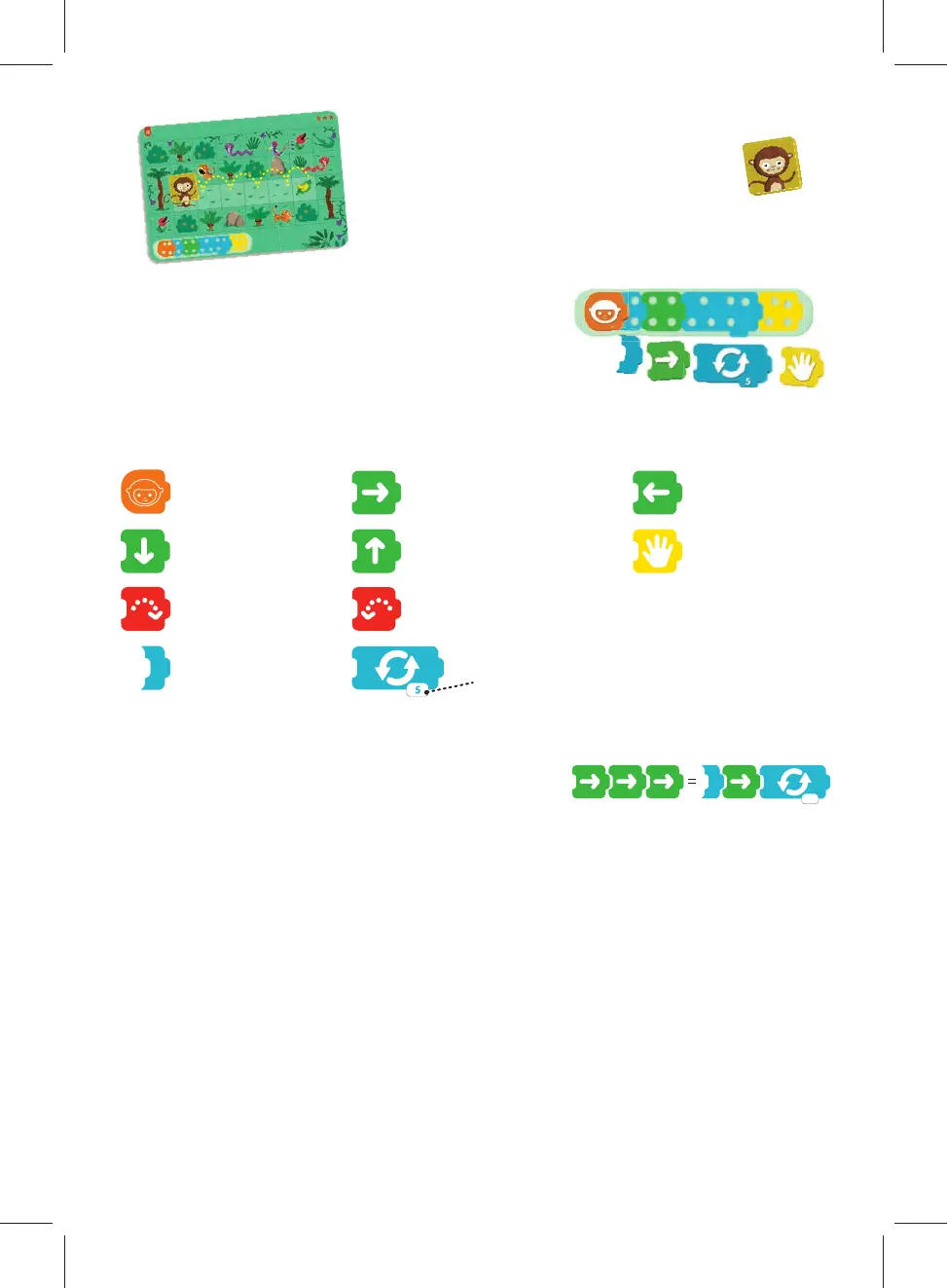
Loop. The action or actions forming the loop will
be repeated according to the number of times
indicated on the game piece.
Execute
Move to
the right
Move to
the left
Move down
Move up
Pick up
Jump to
the right
Jump to
the left
Begin the
loop
3
3


 To Next Page
 Loading...