The T8SG and T8SG Plus are cable of operating under many different protocols. To view the most up to date list of
compatible protocols please visit https://www.deviationtx.com. Please note, new protocols are being added to the
software all the time. Some protocols may require the upgrading of your firmware.
Model Selection.
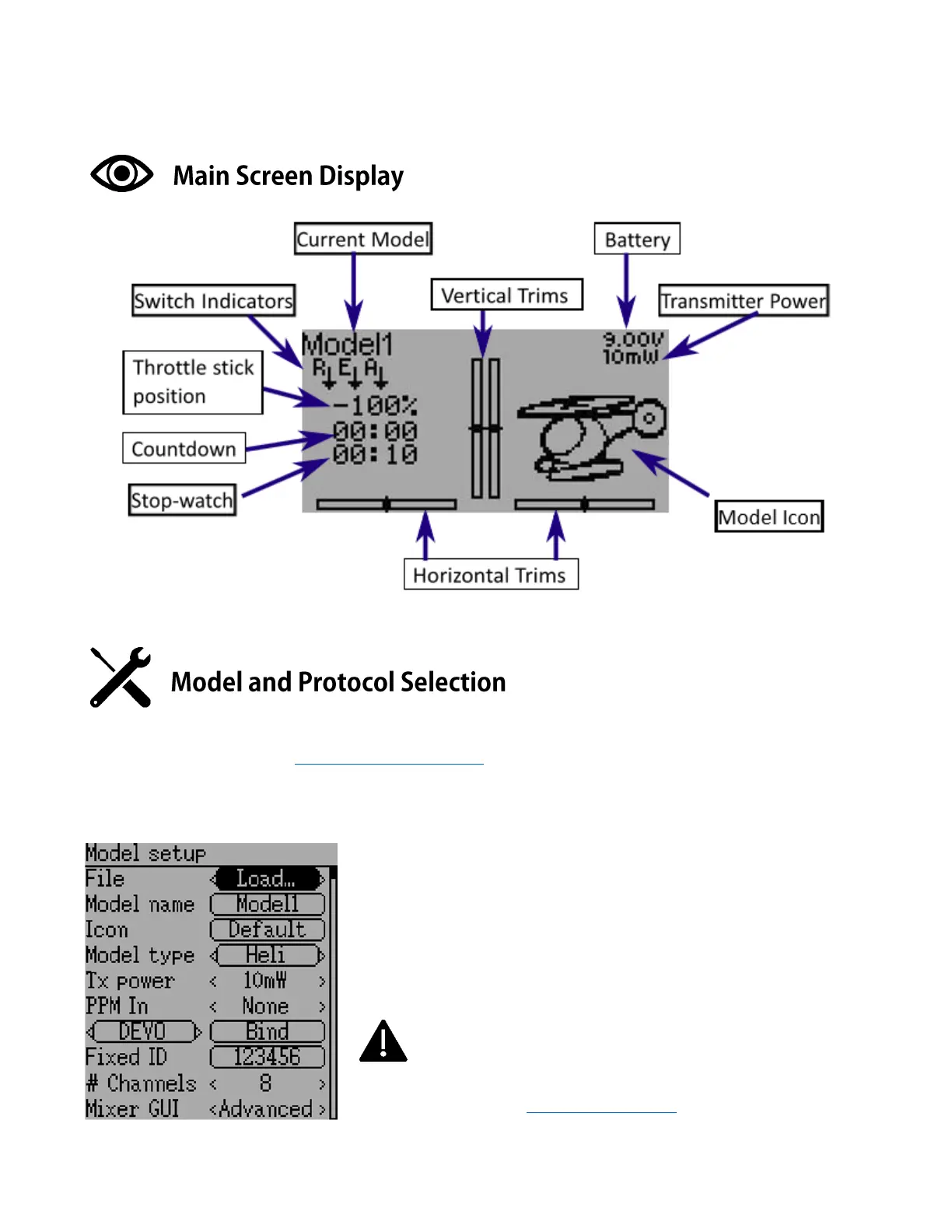
To enter the model setup, press the ENTER button and select Model Menu >
Model setup. From here you can create or load models. Model name can be
input and the default icon also selected. Model type can be selected to suit your
model. TX Power can be adjusted. 10mw-30mw is suitable for most small
models. Below the “PPM In” you will find the protocol selection function. Here
you can choose one of the many protocols available. The Bind button is used to
start the binding process.
NOTE
The Deviation software is very powerful and capable of a great
amount of programing and functionality. We recommend
downloading the comprehensive software setup guide from the link below for
more detailed instructions. http://www.jumper.xyz



 To Next Page