EasyManua.ls Logo

Jung Smart Control 5 - User Manual

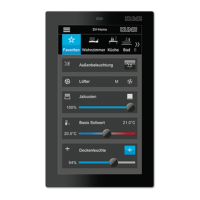
Jung Smart Control 5
3 pages
Print Icon
To Next Page IconTo Next Page
Loading...
Smart Control 5
06.12.20191 / 30024020101
Smart Control 5
Ref.-no.: SC 5 SW
Operating instructions
1 Safety instructions
Electrical devices may only be mounted and connected by electrically skilled persons.
Serious injuries, re or property damage possible. Please read and follow manual fully.
Danger of electric shock. Always disconnect before carrying out work on the devise or load.
These instructions are an integral part of the product, and must remain with the end customer.
2 Structure of the device
2
4
6
1
2
3
4
5
Figures 1 and 2: Structure of the device
(1) Mounting screws
(2) Supporting frame
(3) Mounting hooks
(4) Smart Control
(5) Locking screws
(6) LAN/PoE
3 Function
Intended purpose
- Visualisation and operation of system statuses and information on building automation
- Installation vertical
- Installation in appliance box according to DIN 49073
Product characteristics
- KNX visualisation in combination with Visu Pro Server (ref.-no.: JVP-SERVER-H2, JVP-SENEC-H2)
- KNX visualization in combination with Smart Visu Server (ref.-no.: SV-SERVER-INT)
- eNet visualisation in combination with eNet server (ref.-no.: ENET-SERVER) with software version 2.2 or higher
- Door call function only in combination with Siedle Smart Gateway SG 650-.. or SG 150-..
- High performance HD screen
- Proximity sensor
- Graphical user interface
- Ambient light sensor
- Smart Gateway with integrated image storage
GB
Question and Answer IconNeed help?

Do you have a question about the Jung Smart Control 5 and is the answer not in the manual?

Jung Smart Control 5 Specifications

General IconGeneral
BrandJung
ModelSmart Control 5
CategoryControl Unit
LanguageEnglish

Summary

Operating Instructions

Safety Instructions

Instructions for safe mounting and electrical connection by skilled persons.

Device Structure Overview

Visual representation of the device components and their assembly.

Product Functionality

Intended purpose and key characteristics for building automation.

Installation and Electrical Connection

Information for Skilled Persons

Safety warnings and prerequisites for installation and electrical connection.

Device Operation and Configuration

Sidebar Menu and App Launch

Navigating the sidebar, selecting default apps, and opening apps.

System Settings and Updates

Changing default application, screen saver, and updating firmware.

Technical Specifications and Accessories

Technical Data

Detailed electrical and physical specifications of the Smart Control device.

Compatible Accessories

List of optional power supplies and mounting accessories.

Warranty Information

Details regarding the product warranty and legal framework.

Related product manuals