6
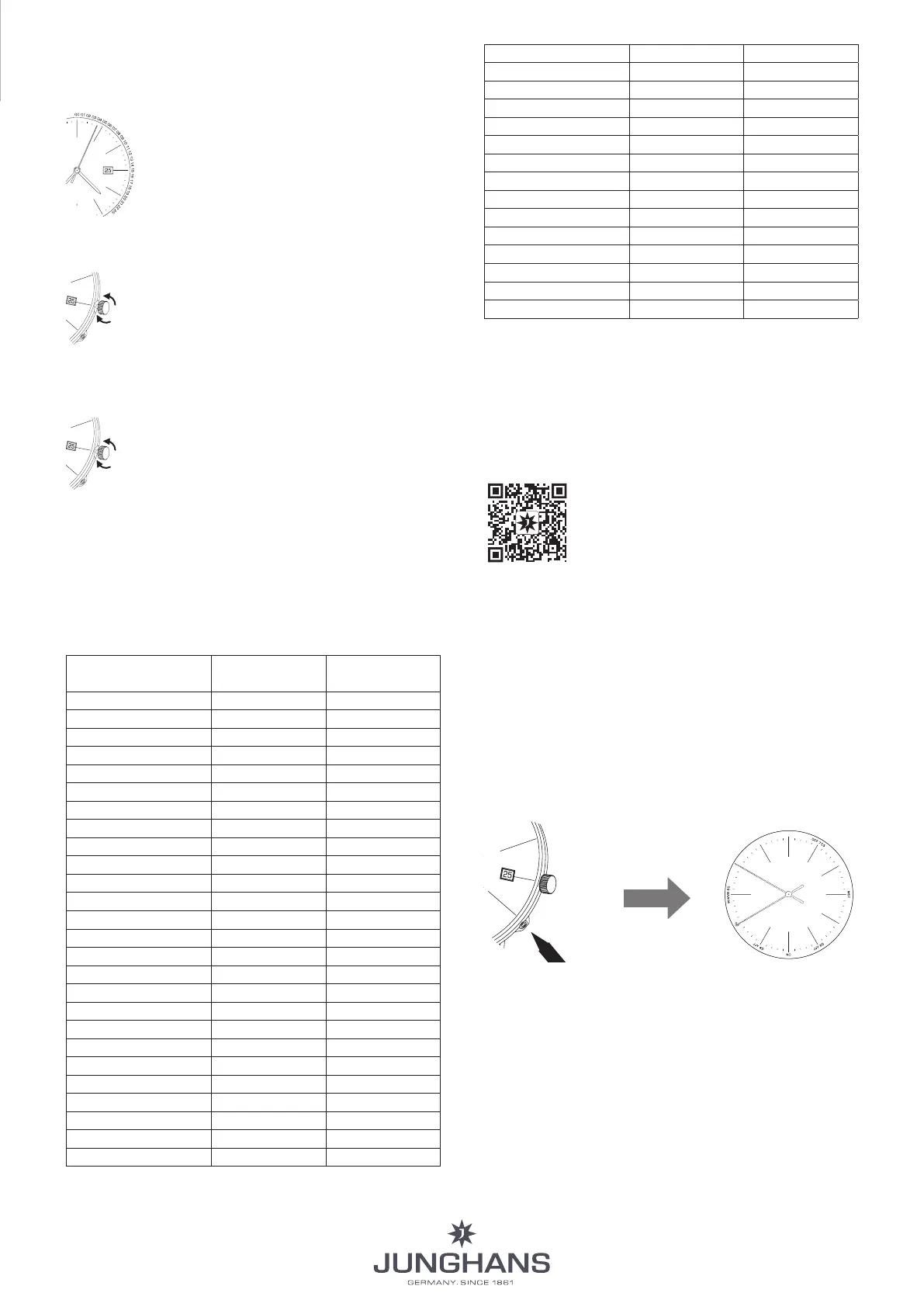
4. Setting the time zone using the crown
A convenient way to set the time zone is to use the crown.
The date is automatically adjusted.
In this process, the second hand indicates
the hour set by turning the crown on the
minute track - see visualisation diagram:
Minute 0 = midnight
Minute 1 = 1 o’clock/ 1 a.m.
Minute 18 = 18:00/6 p.m., etc. until
Minute 23 = 23:00/11 p.m.
Setting in hourly increments:
1h
C
a) Pull the crown to position C
b) You can set the time in steps of one hour
by turning the crown clockwise or coun-
terclockwise.
c) End the procedure by pushing the crown
back to position A.
Setting all known time zones:
1
Zeit-
B
time
zone
a) Pull the crown to position B.
b) You can set all known time zones (includ-
ing quarter-hourly and half-hourly) by
turning the crown clockwise or counter-
clockwise. Each turn of the crown advanc-
es or regresses by one time zone.
c) End the procedure by pushing the crown
back to position A.
Time zones (as of: 1 January 2018):
The table below is based on UTC Standard Time (Coordinated
Universal Time). In summer time, the time changes by one
hour.
City Time zone
crown position B
Time zone
crown position C
London +/– 00 +/– 00
Frankfurt / Paris + 01 + 01
Athen + 02 + 02
Moscow + 03 + 03
Tehran / Iran + 03.30
Dubai / UAE + 04 + 04
Kabul + 04.30
Karachi + 05 + 05
Calcutta + 05.30
Kathmandu + 05.45
Dhaka + 06 + 06
Rangoon + 06.30
Bangkok + 07 + 07
Beijing + 08 + 08
Pyongyang + 08.30
Eucla (Aus) + 08.45
Tokyo + 09 + 09
Adelaide (Aus) + 09.30
Sydney (Aus) + 10 + 10
Lord Howe Island + 10.30
Nouméa + 11 + 11
Norfolk Island + 11.30
Auckland + 12 + 12
Chatham Islands + 12.45
Apia + 13
Chatham - SZ + 13.45
Kiritimati + 14
Baker Island – 12
Midway Islands – 11 – 11
Hawaii – 10 – 10
Marquesas Islands – 09.30
Anchorage US Alaska – 09 – 09
US Pacific – 07 – 07
Denver US Mountain – 08 – 08
Chicago US Central – 06 – 06
New York US Eastern – 04 – 04
US Atlantic – 05 – 05
St. John’s – 03.30
Rio Brasilien – 03 – 03
South Georgia – 02 – 02
Azores – 01 – 01
5. Time synchronisation
The Junghans MEGA offers you 2 options to synchronise the
time:
5.1. Synchronisation using the Junghans App:
With the Junghans App, you can synchronise your watch
with the time data stored in your smartphone.
1. Download App
2. In the menu, select: Set MEGA watch
3. Select “HELP” button for instructions
5.2. Synchronisation via a radio signal
If you are within the transmission range of one of the time
signal transmitters, you can synchronise the time manually.
Your Junghans MEGA can receive radio signals from the fol-
lowing time signal transmitters:
– Europe: DCF77 in Mainflingen
– Japan: JJY40 near Tokyo and JJY60 near Osaka
The range of the transmitters is up to 1500 km depending on
topographical conditions.
4 Sek.
A
H10
H8
4 sec.
Reception phase
Junghans App
Reception phase
time signal transmitter
Press the corrector in crown position A for 4 seconds. The
watch checks various time signals. During this process, the
second hand remains at the 10 o’clock position for up to
-
utes. The hour and minute hands remain at their current
position. As soon as a time signal is received, all hands are
automatically set to the time of the time signal transmitter.
If time synchronisation with one of the transmitters is not
possible, the reception attempt is terminated after 15 min-
utes. Your watch runs on the basis of a quartz watch until
the next synchronisation.
INSTRUCTIONS FOR USE












 To Next Page