5
Calibre: J110
Product: Meister fein Chronoscope MEGA Solar
A few words before you start your watch
In purchasing the Connected radio-controlled watch with
solar power, you have acquired a timepiece that offers you
the latest technology with very simple operation. Once it is
activated - by receiving the radio signal sent by a time signal
transmitter or by using the Junghans MEGA app - it will be a
trusted assistant to have on your wrist. It only needs 2 min-
utes of sunlight a day to display the time reliably.
We hope you enjoy your Junghans!
Uhrenfabrik Junghans GmbH & Co. KG
Contents:
1. Starting your watch
2. Displays.
3. Operation:
4. Stop function
5. Setting the time
6. Adjusting the time zone using the crown
6.1. Setting in hourly increments
6.2. Adjusting all known time zones
7. Synchronisation using the
7.1. Junghans app
7.2. Radio signal
8. Information on solar technology
8.1. Charge level indicator
8.2. Automatic energy saving mode
9. General information
10. Technical information
11. Water resistance
12. Frequently asked questions
1. Starting your watch
1
2
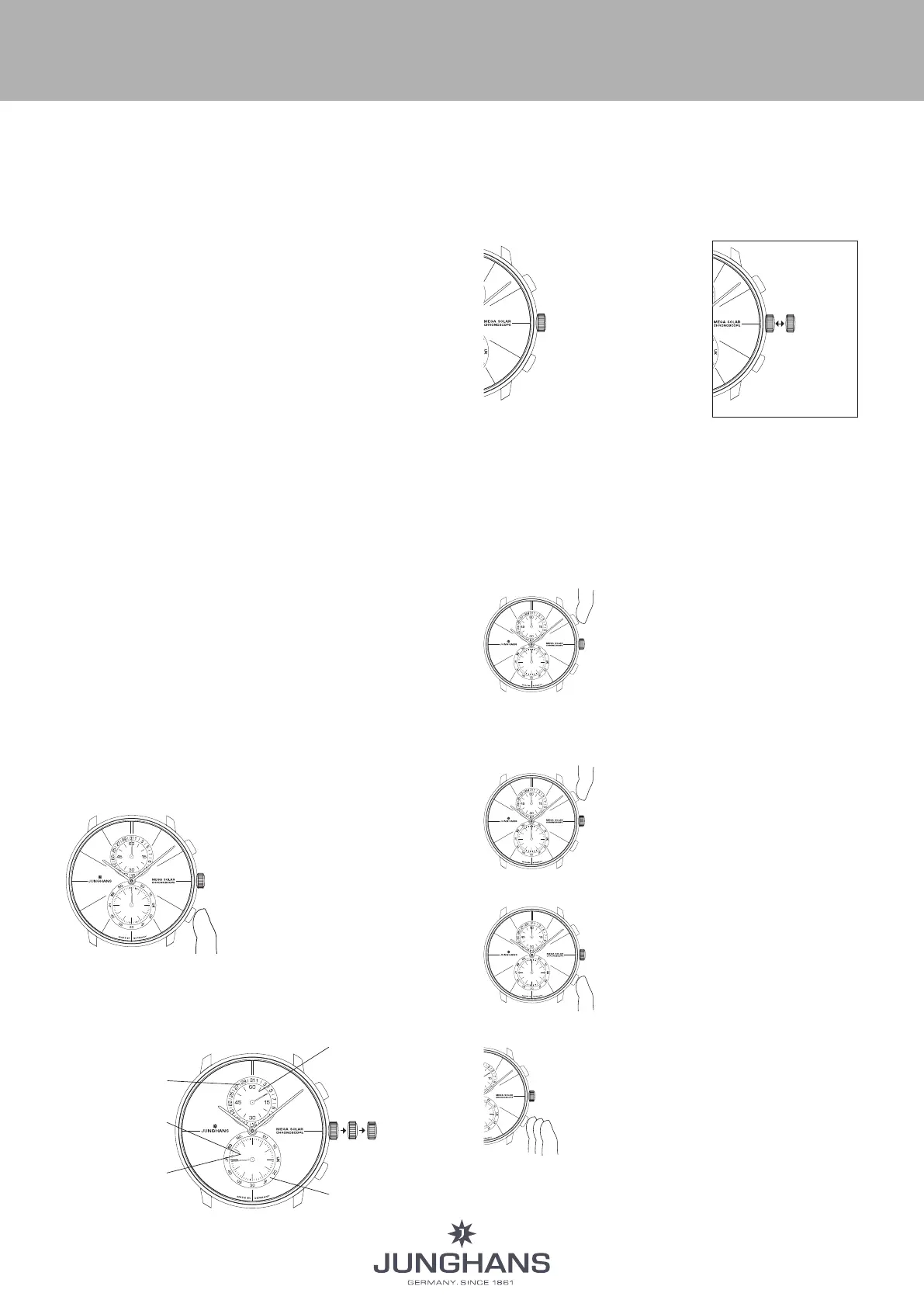
For energy-saving reasons,
your watch is set to the
"Chronograph" mode.
Press the lower button 2 to
switch to the time display.
The date and seconds are then
displayed in the totalisers.
2. Displays
The watch has two display modes:
- Time display
-
Stop function (chronoscope)
Seconds display
Date display
Stop function:
60-seconds
counter
Reception mode:
received time signal
Stop function:
60-minute counter
Crown
positions
Button 1
Button 2
3. Operation
Button 1:
•
Change to
stop function
• Stop times
Button 2:
• Reception mode
• Manual time synchronisation
• Change to time display
(End stop function)
•
Add stop times
Pull the crown
and then return
it to position A
= cancels the
function/setting
4. Stop function (chronoscope)
Maximum stop time: 60 minutes, with automatic
Chronostop after stop times of 60
minutes
Stop times: Minutes, ½ second
Changing from time display to stop function
(chronoscope mode)
• Press button 1 briefly to change to the
stop function.
• The stop second hand and the stop
minute hand move to the start posi-
Note: You can start the starting process immediately, even
if the hands have not yet reached the start position.
Starting the timer:
• Start the chronoscope by pressing
button 1.
• Stopping the timer:
Stop the chronoscope by pressing
button 1 again.
Setting zero position display:
Press button 2.
This returns all stop displays to their
zero position.
Addition timer:
• You can add stop times by starting the
stop function and then pressing button 2.
The split time is displayed (the stop func-
tion continues to run in the background).
Press button 2 again to continue the stop
function.
• You can repeat this process as often as you
want.
INSTRUCTIONS FOR USE












 To Next Page