40 Mesa 3 Rugged Tablet Owner’s Manual
How to Use the Dock
1. Provide power to the dock using the 30 W AC wall
charger provided with your Mesa 3. A 45 W charger
is available as an option, and we recommend this
charger if you are using the dock as an ofce computer
with several peripheral functions. The 30 W AC wall
charger might not provide enough power to charge the
batteries and run the Mesa 3.
2. Plug in the cables for your desired setup.
3. If a hand strap is covering the pin contacts on the Mesa
3, unhook one end or remove it.
4. Hold the Mesa 3 horizontally with the docking pin
contacts facing down. Place it over the dock alignment
pins and press down until you feel and hear the lock
engage.
5. The Mesa 3 charges more quickly if the power settings
are set up to allow the Mesa 3 to enter a low power
mode when it is not in use, but is plugged in. To adjust
this setting, go to the Start menu, then Settings > System
> Power & sleep.
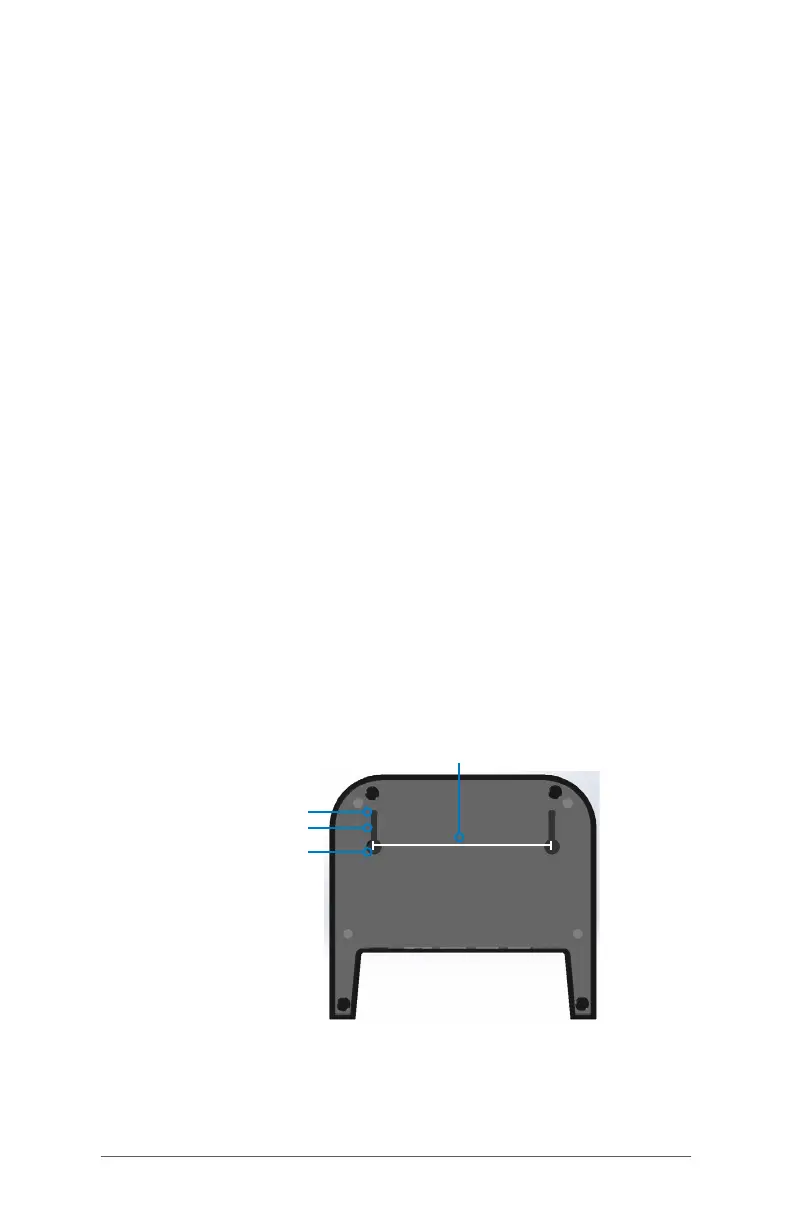
Mounting the Dock to a Surface
The Ofce Docking Station is freestanding. It can also be
mounted to a surface like a desk or shelf. There are keyhole
slots on the bottom for this purpose.
4” (101.5 mm)
.175” (4.445 mm)
.125” (3.175 mm)
.350” (8.89 mm)



 To Next Page