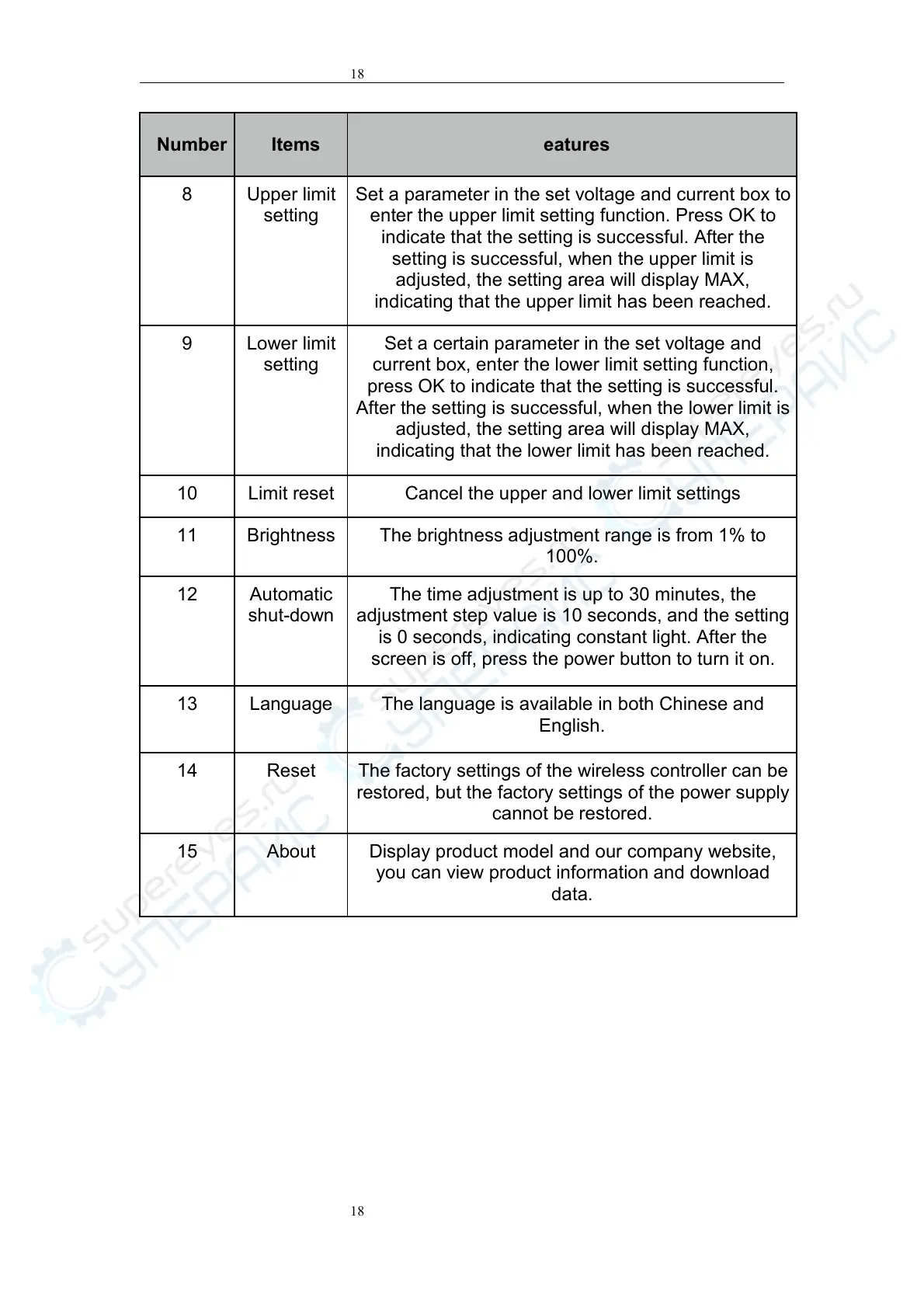
Set a parameter in the set voltage and current box to
enter the upper limit setting function. Press OK to
indicate that the setting is successful. After the
setting is successful, when the upper limit is
adjusted, the setting area will display MAX,
indicating that the upper limit has been reached.
Set a certain parameter in the set voltage and
current box, enter the lower limit setting function,
press OK to indicate that the setting is successful.
After the setting is successful, when the lower limit is
adjusted, the setting area will display MAX,
indicating that the lower limit has been reached.
Cancel the upper and lower limit settings
The brightness adjustment range is from 1% to
100%.
The time adjustment is up to 30 minutes, the
adjustment step value is 10 seconds, and the setting
is 0 seconds, indicating constant light. After the
screen is off, press the power button to turn it on.
The language is available in both Chinese and
English.
The factory settings of the wireless controller can be
restored, but the factory settings of the power supply
cannot be restored.
Display product model and our company website,
you can view product information and download
data.


 To Previous Page
 Loading...