EasyManua.ls Logo

Juntek DPM-8608 - Calibration and Interface Navigation

Default Icon
18 pages
Print Icon
To Next Page IconTo Next Page
To Previous Page IconTo Previous Page
Loading...
8
8
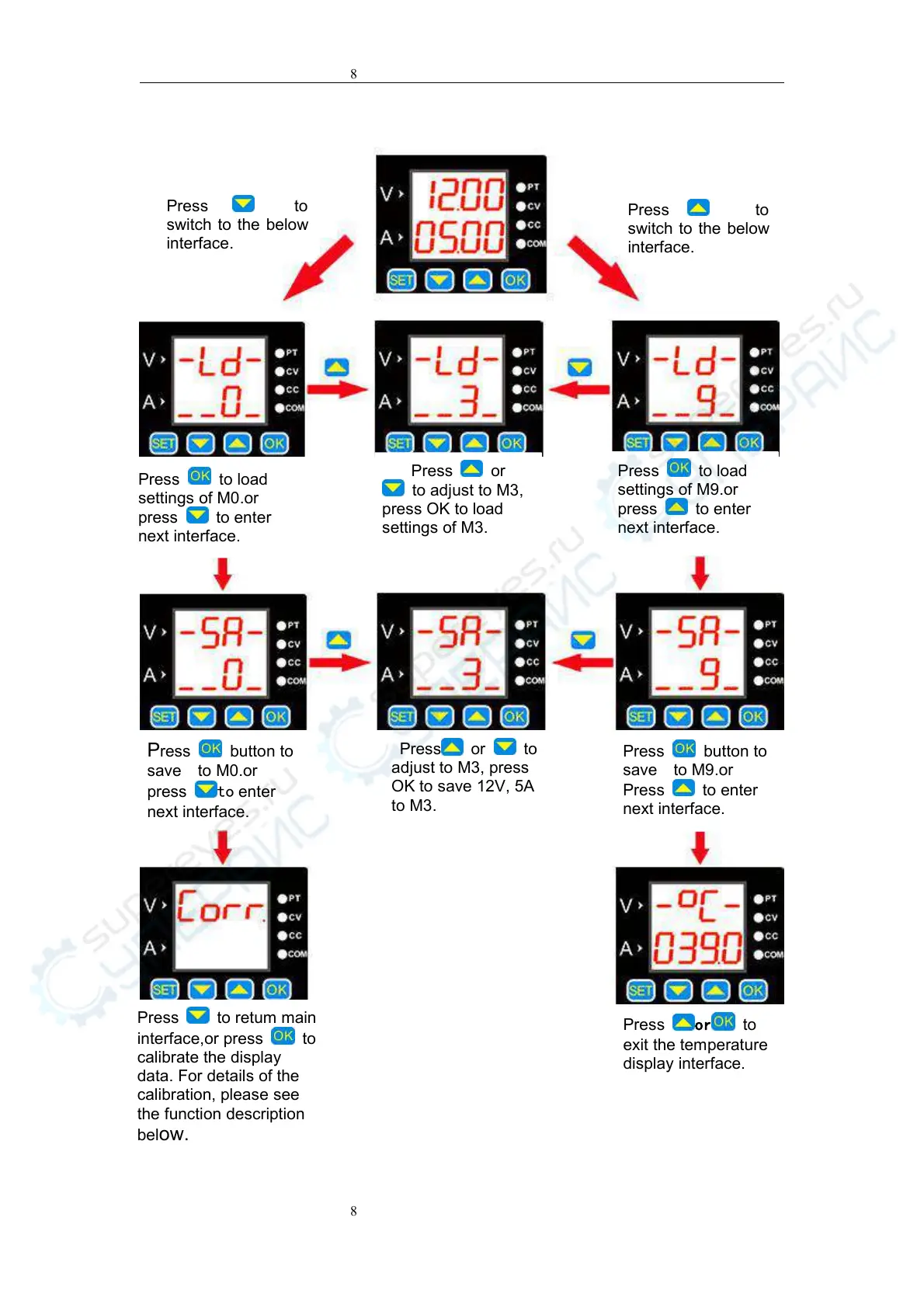
Press to
switch to the below
interface.
Press to
switch to the below
interface.
Press to load
settings of M0.or
press to enter
next interface.
Press or
to adjust to M3,
press OK to load
settings of M3.
Press to load
settings of M9.or
press to enter
next interface.
Press to retum main
interface,or press
to
calibrate the display
data. For details of the
calibration, please see
the function description
bel
ow.
Press
or
to
exit the temperature
display interface.
Press button to
save to M0.or
press to enter
next interface.
Press button to
save to M9.or
Press
to enter
next interface.
Press or to
adjust to M3, press
OK to save 12V, 5A
to M3.

Related product manuals