2
Table of contents
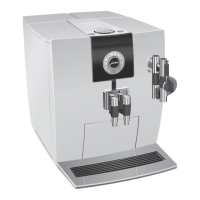
Your IMPRESSA J9 One Touch
IMPORTANT SAFEGUARDS 4
Control elements 8
Important information 10
Proper use .....................................................................................................................................................10
For your safety ..............................................................................................................................................10
1 Preparing and using for the first time 13
JURA on the Internet ....................................................................................................................................13
Setting up the machine ..............................................................................................................................13
Filling the water tank ...................................................................................................................................13
Filling the bean container ...........................................................................................................................13
First-time use ................................................................................................................................................14
Inserting and activating the filter ..............................................................................................................15
Determining and adjusting the water hardness .....................................................................................16
Adjusting the grinder ..................................................................................................................................17
2 Preparation 18
Ristretto, espresso and coffee ....................................................................................................................18
Preparing two speciality coffees at the touch of a button ...................................................................18
Latte macchiato, cappuccino .....................................................................................................................19
Hot milk and milk foam .............................................................................................................................20
Preground coffee .........................................................................................................................................20
Permanently setting the amount of water for the cup size .................................................................21
Hot water ......................................................................................................................................................22
3 Daily operation 24
Switching on ................................................................................................................................................24
Daily maintenance ......................................................................................................................................24
Switching off ................................................................................................................................................25
4 Permanent settings in programming mode 26
Product s ........................................................................................................................................................27
Energy-saving mode ..................................................................................................................................29
Automatic switch-off ..................................................................................................................................30
Rinses ............................................................................................................................................................30
Restore factory settings ..............................................................................................................................31
Viewing information and maintenance status ......................................................................................32
Unit for amount of water ...........................................................................................................................33
Brightness of symbols ................................................................................................................................34
Language ......................................................................................................................................................34



 To Next Page
 Loading...