No. 52029
V-14A3
V-1415EE
V-14AMG
29
PURITY / CONVERGENCE ADJUSTMENT
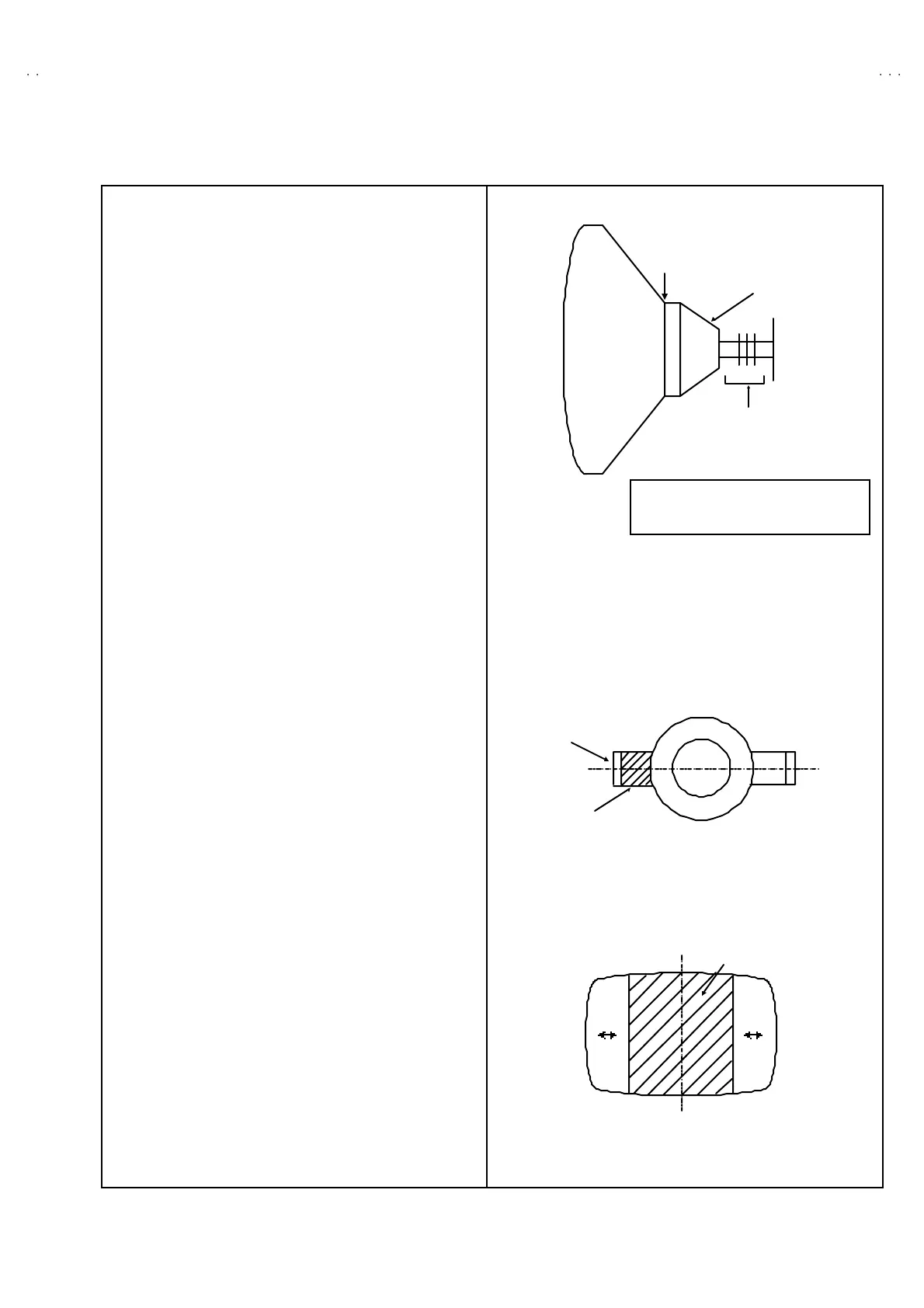
PURITY ADJUSTMENT
1. Dem ag ne tize CRT wit h t he dema gn etizer .
2. L oose n th e r e tain er screw of th e d eflec tion yoke .
3. Rem ove th e wedge s.
4. Inp ut a g reen rast er sign al from the sign al ge ner at or, an d turn
th e scre en t o g reen raste r.
5. Move the deflection yoke backward.
6. Bring t he lo ng lug of th e p urity magn ets on the sho rt lu g a nd
p osit ion t he m horizon tally. (Fig. 2)
7. Ad just t he ga p be tween t wo lug s so that th e G REEN RAS TER
will come into the center of the screen. (Fig.3)
8. M ove the d eflect ion yoke forward, a nd fix the pos itio n of th e
deflection yoke so that the whole screen will become green.
9. Ins ert the we dg e t o th e t op side of the def lect ion yo ke so th at it
will not move.
10 . Inp ut a cross hat ch sig na l.
11 . Verif y tha t the scre en is hor izon tal.
12 . Inp ut r ed and b lue rast er sign als, and m ake su re that purity is
prop erly ad juste d.
CR T
WEDGE
DEFLECTION
YOKE
P / C
MAGNETS
P
46
PURIT Y MAGNETS
Long lug
Short lug
Bring the long lug over the short lug
and position them horizontally.
(F RONT VIEW )
GREEN RASTER
CEN TER
P : PURITY MAGNE T
4 : 4 P OL ES (con vergen ce magn ets)
6 : 6 P OL ES
(con vergen ce magn ets)
#
P/ C MAGNETS
Fig.1
Fig.3
Fig.2




 To Next Page