10
MENU 2
AUTO SHUTOFF ON
CHILD LOCK OFF
BLUE BACK ON
AI ECO DISPLAY ON
SELECT BY EXIT BY
OPERATE BY -+
DISPLAY
Changes the AUTO
SHUTOFF setting.
MENU number
The icon on
the left indicates
the currently
selected function.
Using the TV’s menus
This TV has a number of functions you can operate using the menus. To use all your TV’s
functions fully, you need to understand how to use the menus.
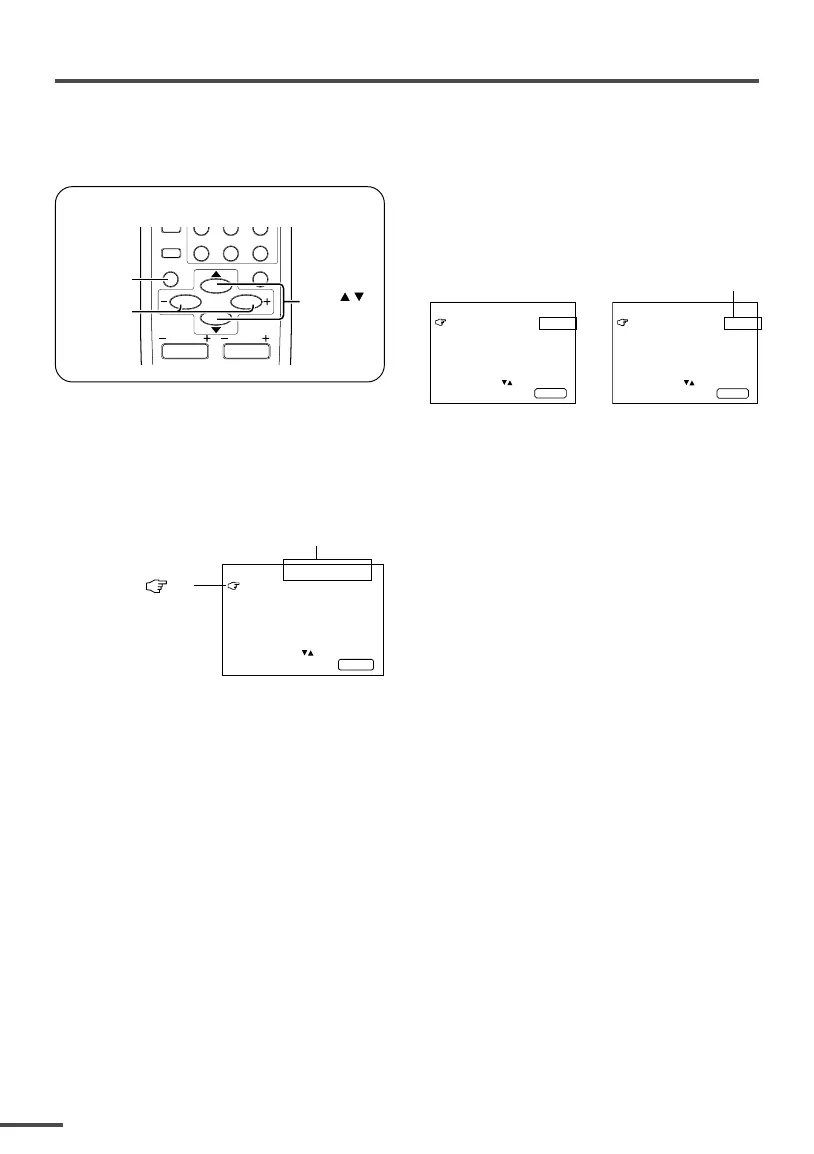
<RM-C360GY/RM-C364GY>
RETURN
+
0
-
/
--
CHANNEL
SCAN
DISPLAY
MENU
VOLUME
MUTING
DISPLAY
button
MENU /
buttons
MENU –/+
buttons
CHANNEL
■ Basic operation
1 Press the MENU T buttons.
One of the 4 menus is displayed.
MENU 1
INPUT TV
ON TIMER
PR 1 0:00
VNR OFF
SELECT BY EXIT BY
OPERATE BY -+
DISPLAY
2 Repeatedly press the MENU T
buttons to display a desired
menu.
• If you hold down the y button, the next
menu is displayed.
• If the selected function is on the first line,
pressing the r button displays the
preceding menu.
3 Repeatedly press the MENU T
buttons to select a desired
function.
4 Press the MENU M buttons to
change function settings.
Example:
MENU 2
AUTO SHUTOFF OFF
CHILD LOCK OFF
BLUE BACK ON
AI ECO DISPLAY ON
SELECT BY EXIT BY
OPERATE BY -+
DISPLAY
⇔
• With some functions, the operation
method may differ.
5 Press the DISPLAY button to turn
the display off.
•To operate a menu using the buttons on
the front panel of the TV, refer to
“Operating menus” on page 18.



 To Next Page