ENGLISH - 14 -
Connect the External Equipments
Before connecting anything
Switch off all equipments including the TV.
Read the manuals provided with the equipments.
To select an AV mode
Pressing "AV" button on the remote control selects one of AV modes (EXT-1, RGB, EXT-2, EXT-2S and EXT-3).
To return to the TV mode, repeatedly press AV button.
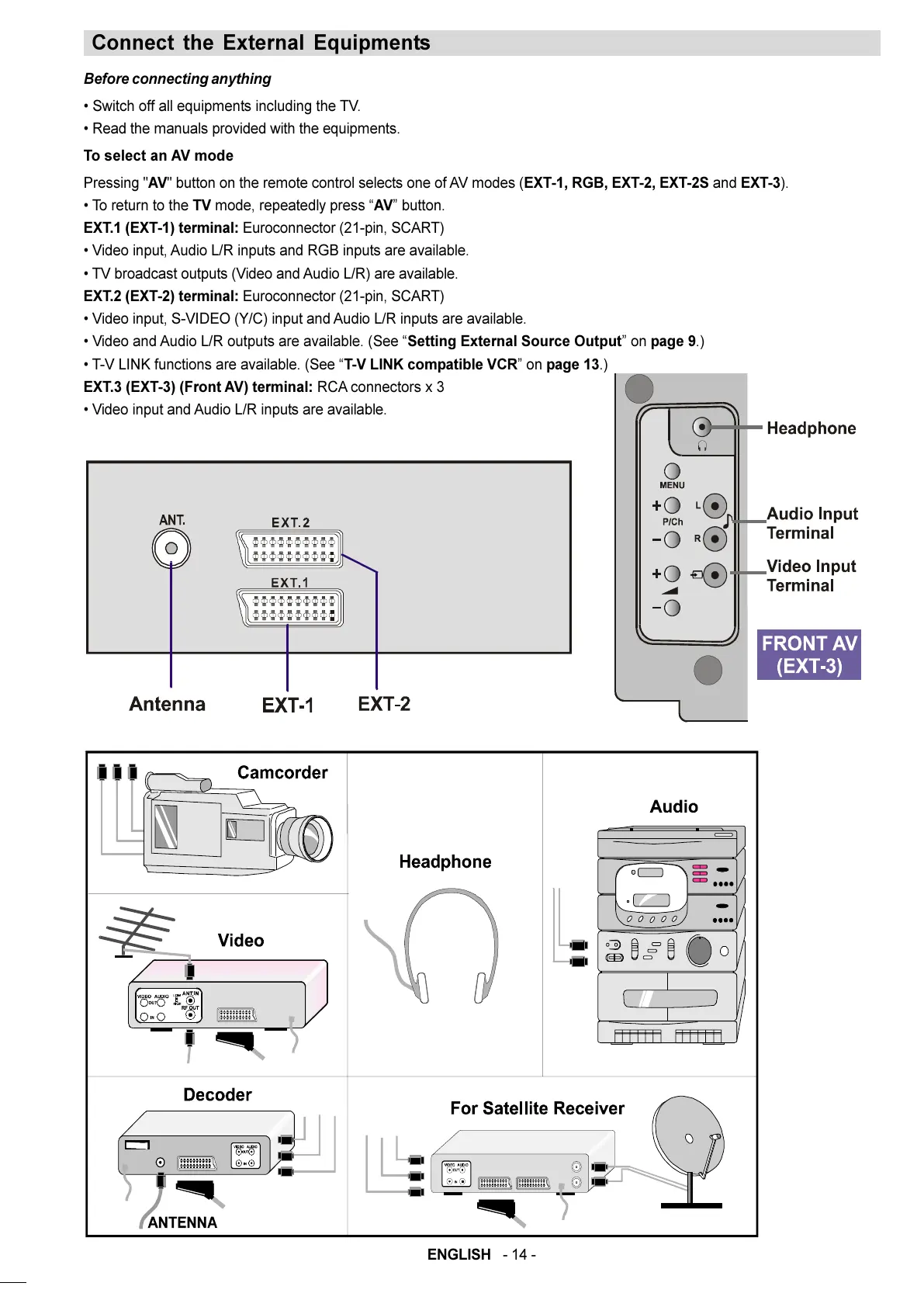
EXT.1 (EXT-1) terminal: Euroconnector (21-pin, SCART)
Video input, Audio L/R inputs and RGB inputs are available.
TV broadcast outputs (Video and Audio L/R) are available.
EXT.2 (EXT-2) terminal: Euroconnector (21-pin, SCART)
Video input, S-VIDEO (Y/C) input and Audio L/R inputs are available.
Video and Audio L/R outputs are available. (See Setting External Source Output on page 9.)
T-V LINK functions are available. (See T-V LINK compatible VCR on page 13.)
EXT.3 (EXT-3) (Front AV) terminal: RCA connectors x 3
Video input and Audio L/R inputs are available.
01-ENG-2835-AK45-C1100UK-4-3-(AV-28KT1&BUF&SUF).p65 28.05.2003, 19:5614


 To Next Page