English
– 5 –
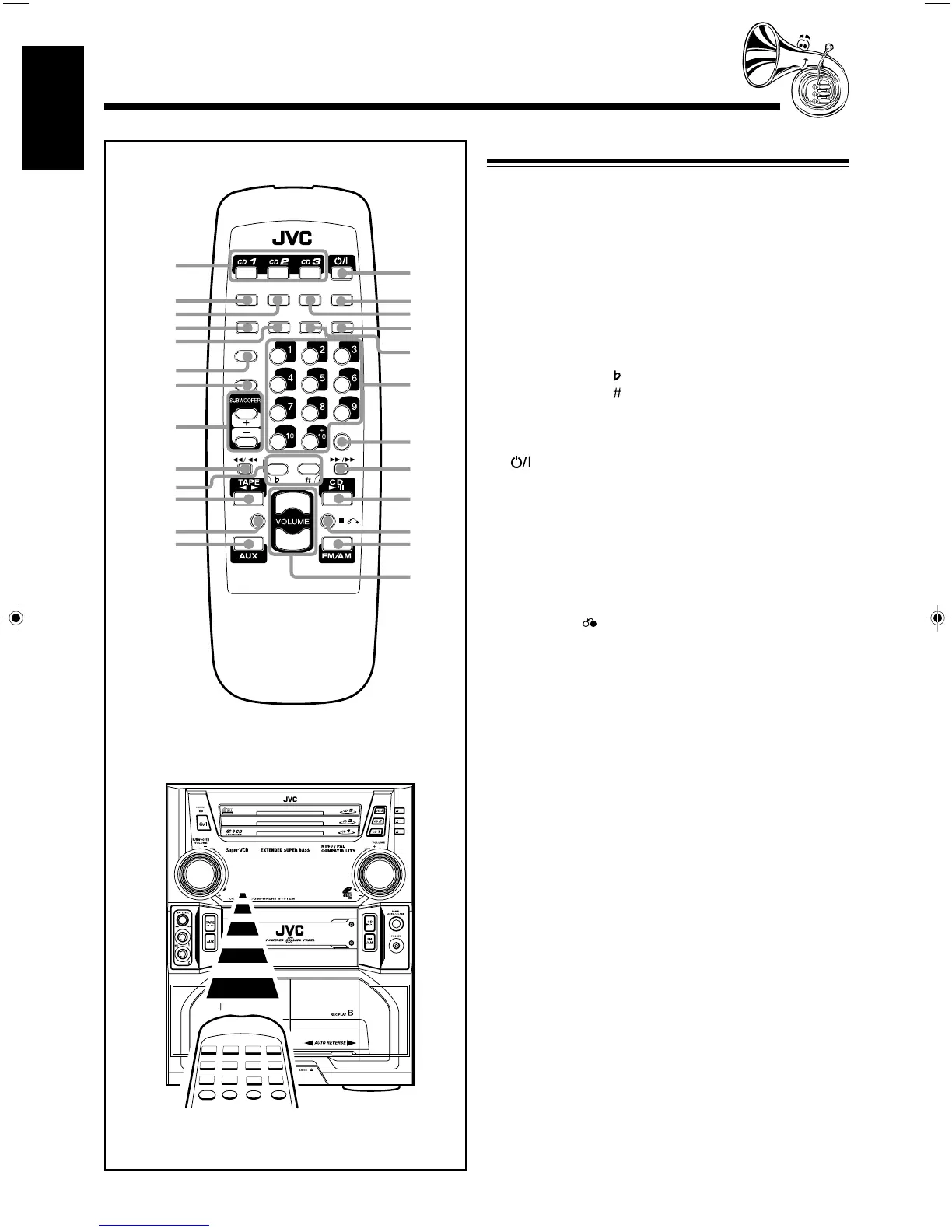
When using the remote control, point it at the remote
sensor on the front panel.
Remote Control
Remote Control
1 Disc number buttons (CD1, CD2, and CD3) (13)
Pressing one of these buttons also turns on the unit.
2 SOUND MODE button (10)
3 VOCAL MASKING button (20)
4 STILL button (18)
FM MODE button (12)
5 V.INTRO button (19)
6 TAPE A/B button (20)
7 REC START/STOP button (21)
8 SUBWOOFER +/– button (10)
9 PREV 1/4 button (14-20)
p KEY CONTROL button (25)
q KEY CONTROL button (25)
w TAPE 2 3 button (9, 20)
e FADE MUTING button (10)
r AUX button (9)
t (On/Standby) button (9)
y SLEEP button (28)
u ECHO button (24)
i SUBTITLE button (19)
o HIGHLIGHT button (19)
; Number buttons (12, 14, 19)
a ON SCREEN buttons (18)
s NEXT ¢/¡ buttons (14-20)
d CD £¥8 buttons (9, 13)
f SELECT 7 buttons (13 – 19)
g FM/AM buttons (9, 12)
h VOLUME +/– buttons (10)
COMPACT
SUPER VIDEO
SELECT
TAPE A/B
FADE
MUTING
RM–SMXJ770V REMOTE CONTROL
SLEEPECHO
SOUND
MODE
VOCAL
MASKING
REC
START/STOP
1
2
4
5
6
7
8
9
p
;
o
i
u
y
t
r
w
e
q
3
SUBTITLEHIGHLIGHT
FM MODE
STILL
V.INTRO
ON SCREEN
PREV
SELECT
NEXT
KEY CONTROL
a
s
f
h
d
g
EN01-12.MX-J770[U]/3 16/06/2000, 9:24 AM5



 To Next Page