To assembleandconnectthe AM loopantenna
To assemble the AM loop antenna
To connectthe AVCOIVlPULINKcords
This system allows you to use JVC's TV with simple
operations; by starting playing back a disc, the TV
automatically turns on arrd changes the irrput mode to tire
appropriate position so that you cart view' the playback
picture.
To use AV COMPU LINK, you need to connect the System
arrd the TV by using a cord with monaural mini-plugs (not
supplied) in addition to the video irrput/output connection
through the COMPONENT jacks, S-VIDEO jack or VIDEO
(composite) jack on the rear.
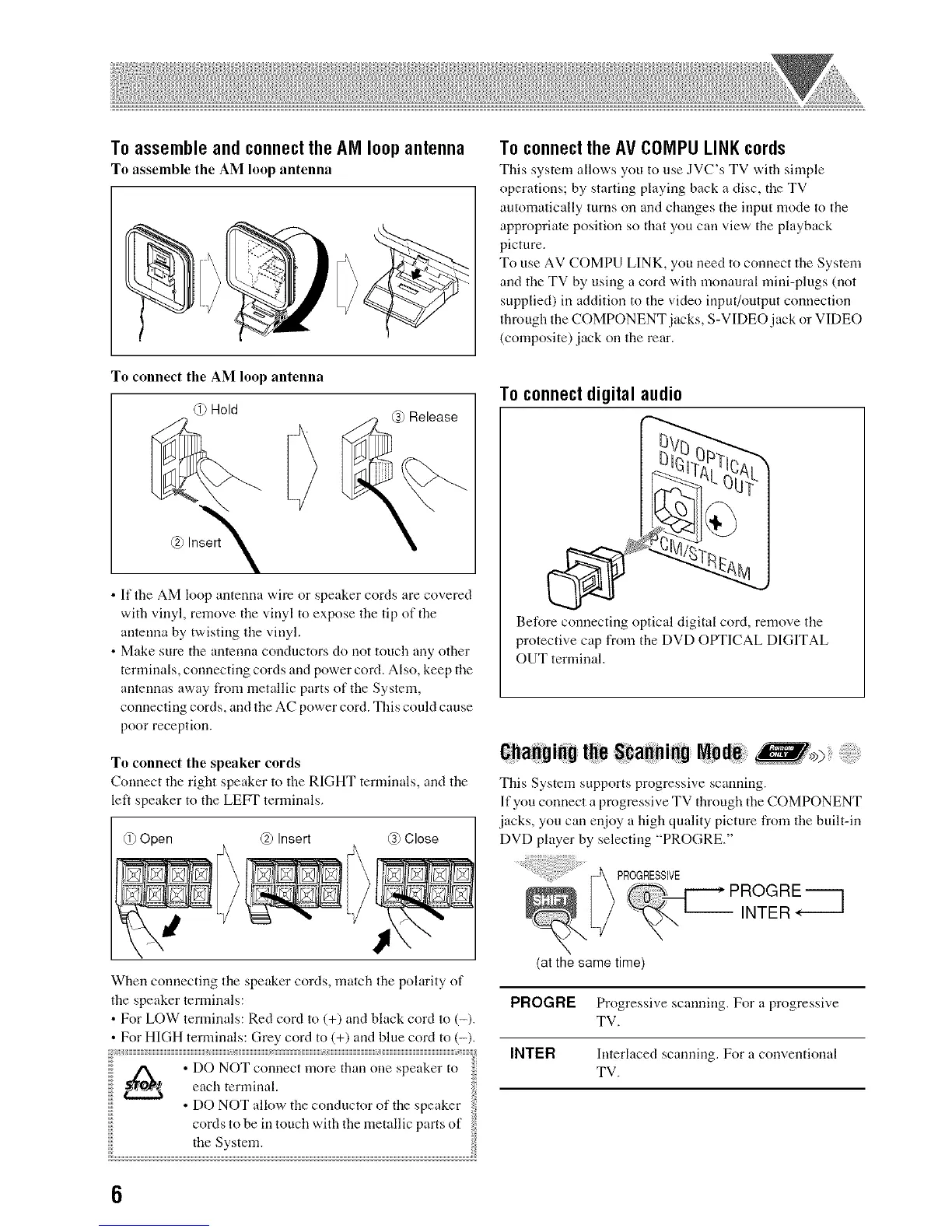
To connect the AM loop antenna
(i) Hold
@ Insert
• If the AM loop antenna wire or speaker cords are covered
with vinyl, remove the vinyl to expose the tip of the
arrtenna by twisting the vinyl.
• Make sure the antenna conductors do not touch any other
terminals, connecting cords arrd power cord. Also, keep the
arrtennas away from metallic parts of the System,
connecting cords, arrd the AC power cord. This could cause
poor reception.
To connect the speaker cords
Connect the right speaker to the RIGHT terminals, and tire
left speaker to the LEFT terminals.
@ Open @ Insert @ Close
When connecting tire speaker cords, match the polarity of
the speaker terminals:
• For LOW terminals: Red cord to (+) and black cord m (-).
For HIGH terminals: Grey cord to (+) arrd blue cord to (-).
iiiii
iiiii
iiiii
iiiii
• DO NOT allow the conductor of the speaker
cords to be in touch with the metallic parts of
the System.
To connect digital audio
BeR)re connecting optical digital cord, remove the
protective cap from the DVD OPTICAL DIGITAL
OUT terminal.
6ha_gi88 t_e iS#a_ai:88 N0 )
This System supports progressive scanning.
If you connect a progressive TV through the COMPONENT
jacks, you can enjoy a high quality picture from the built-in
DVD player by selecting "PROGRE."
PROGRESSIVE
PROGRE----]
INTER
(at the same time)
PROGRE Progressive scanning. For a progressive
TV.
INTER Interlaced scanning. For a conventional
TV.
6


 To Next Page