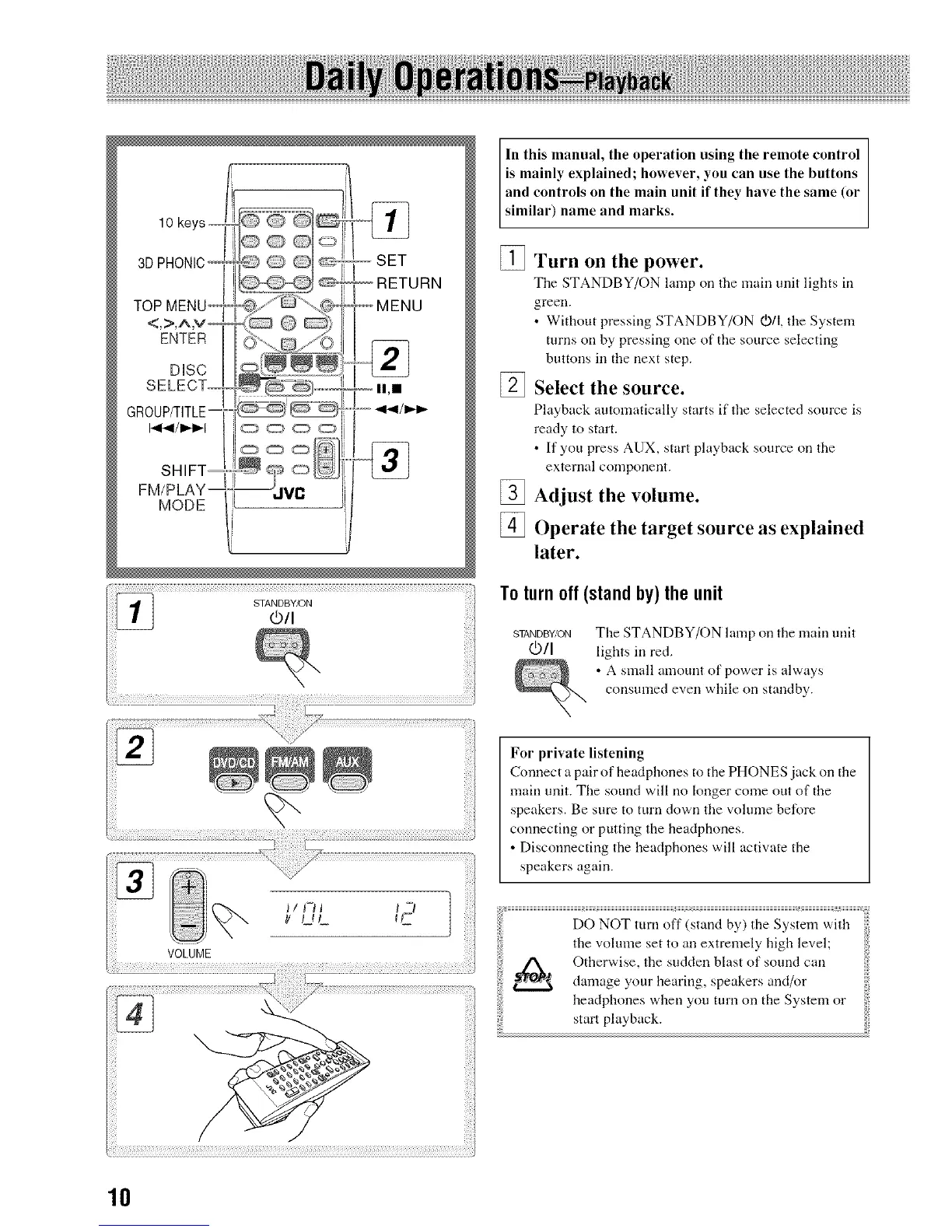
10 keys --
3DPHONIC
ENTER
DiSC
ii,m
FM/PLAY
MODE
STANDBY/ON
@/I
In this manual, the operation using the remote control
is mainly explained; however, you can use the buttons
and controls on the main unit if they have the same (or
similar) name and marks.
[] Turn on the power.
The STANDBY/ON lamp oil the main unit lights ill
green.
• Without pressing STANDBY/ON 0)/I, the System
turns oil by pressing one of the source selecting
buttons ill tile next step.
Select the source.
Playback automatically starts if the selected source is
ready to start.
• If you press AUX, start playback source oil the
external conlponeut.
[] Adjust the volume.
[] Operate the target source as explained
later.
To turn off (stand by) the unit
STANDBY/ON
@/I
The STANDBY/ON lamp on the main unit
lights ill red.
• A small amount of power is always
consumed even while on standby.
For private listening
Connect a pair of headphones to the PHONES jack on tile
main unit. The sound will no longer come out of the
speakers. Be sure to turn down the vohune before
connecting or putting the headphones.
• Disconnecting the headphones will activate the
speakers again.
the volume set to all extremely high level;
Otherwise, the sudden blast of sound call
damage your hearing, speakers and/or
headphones when you turn on the System or
start playback.
10


 To Next Page