EisteninOt_ the::R_di_
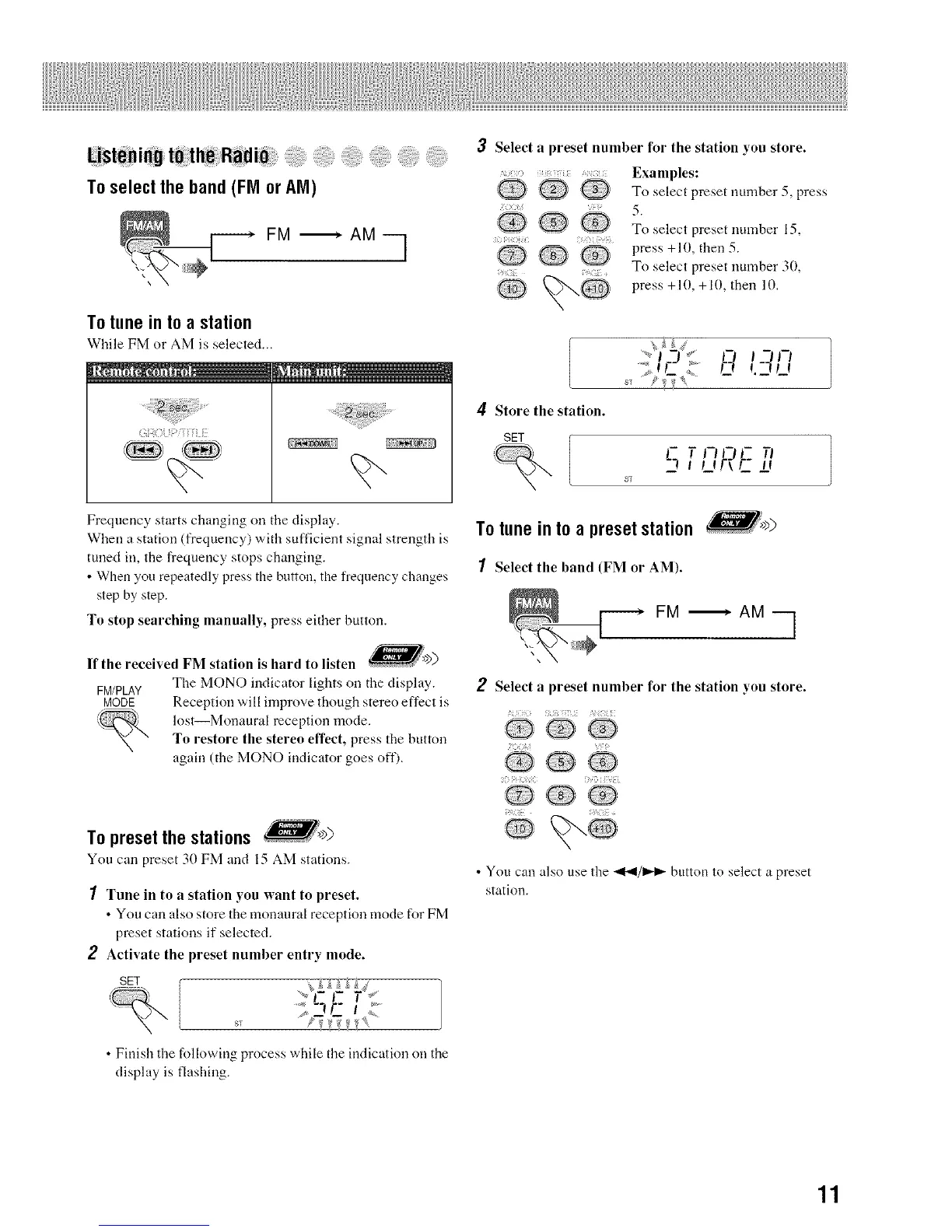
Toselecttheband(FMor AM)
FM '_ AM q
To tune in to a station
While FM or AM is selected...
Frequency starts changing on tile display.
When a station (frequency) with sufficient signal strength is
tuned ill, the frequency stops changing.
• When you repeatedly press the button, tile frequency changes
step by step.
To stop searching manually, press either button.
If the received FM station is hard to listen )
The MONO indicator lights on the display.
FM/PLAY
MODE Reception will ilnprove though stereo effect is
lost--Monaural reception mode.
To restore the stereo effect, press the button
again (the MONO indicator goes off).
To preset the stations
You call preset 30 FM and 15 AM stations.
1 Tune in to a station you want to preset.
• You can also store the monaural reception mode for FM
preset stations if selected.
2 Activate the preset number entry mode.
SET [
• Finish the following process while the indication on the
display is flashing.
3 Select a preset number for the station you store.
?) [{ '7
@@
QQ
Examples:
To select preset number 5, press
5.
To select preset number 15,
press +10, then 5.
To select preset number 30,
press +10, +10, then 10.
17Jt-I
....._r...... m
> ,_ ,,_, _ I.-'f LI
4 Store the station.
SETl
_% q r noc n
t p fr_F_- ±r
ST
To tune in to a preset station
1 Select the band (FM or AM).
FM _ AM q
2 Select a preset number for the station you store.
/ {7{{ 7{
Q i_........... IQ
@ @ @
• You can also use the _I/ID,._ button to select a preset
station.
11


 To Next Page