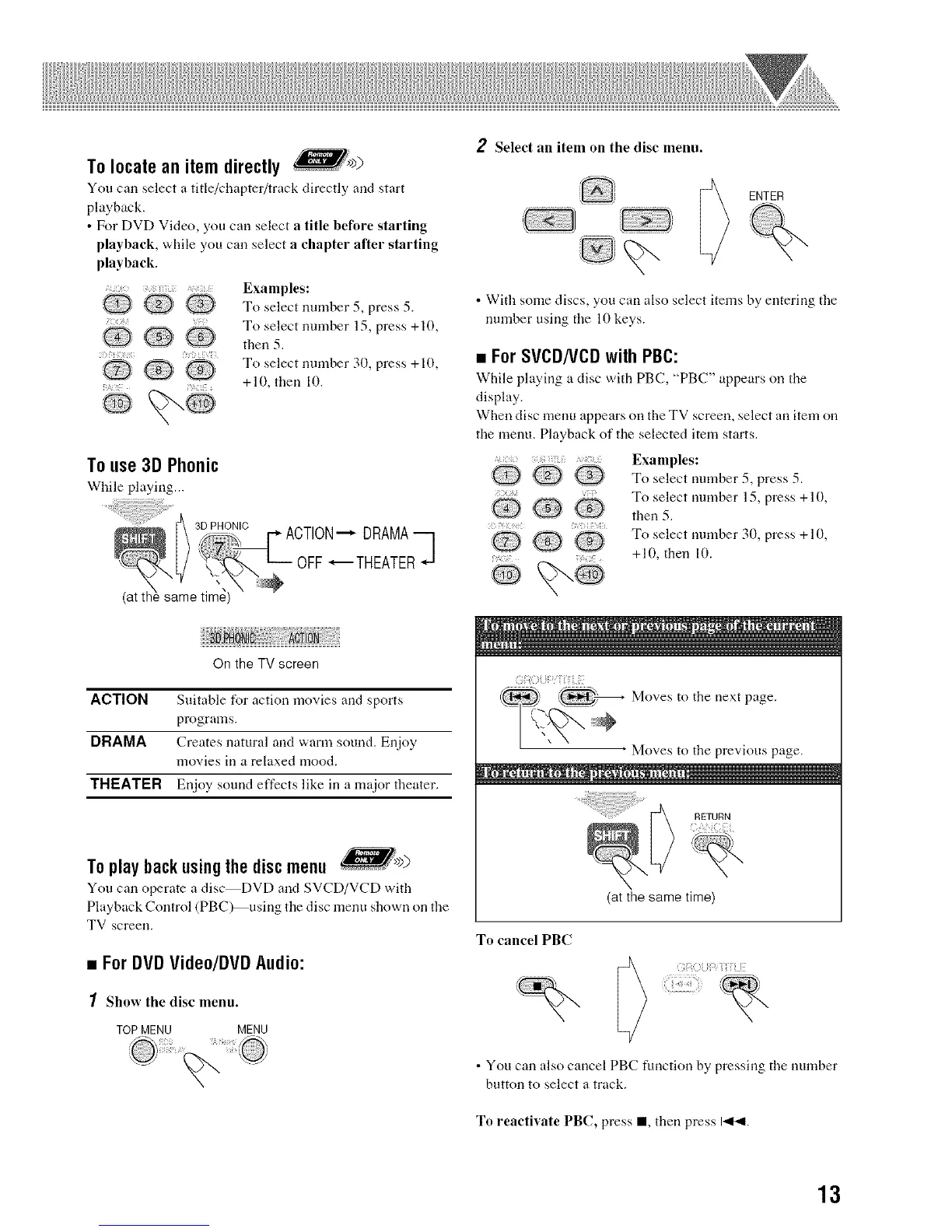
To locatean item directly >
You can select a title/chapter/track directly and start
playback.
• For DVD Video, you carl select a title before starting
playback, while you can select a chapter after starting
playback.
Examples:
'Q _Q_ _Q_' To select nmnber 5, press 5.
To select number 15. press +10.
...... LQ)
Q then 5.
i:
,Q _ % Q To select nmnber 30. press +10.
+10, then 10.
To use3D Phonic
While playing...
.9 Select an item on the disc menu.
ENTER
• With some discs, you can also select items by entering the
nmnber using tire lO keys.
• ForSVCDNCDwith PBC:
While playing a disc with PBC, "PBC" appears on tire
display.
When disc menu appears on the TV screen, select an item on
the menu. Playback of the selected item starts.
+: Exanlples:
_,._// Q To select nmnber 5, press 5,
Q_ --_ _ ,_ To select nmnber 15, press +10.
then 5.
Q To select nmnber 30, press + l0,Q
+10, then 1().
On the TV screen
ACTION Suitable tbr action movies arrd sports
programs.
DRAMA Creates natural arrd warm sound. Enjoy
movies in a relaxed mood.
TNI:ATI=R Enjoy sound effects like in a major theater,
To play back usingthe disc menu
You can operate a disc DVD and SVCD/VCD with
Playback Corrtrol (PBC)_using the disc menu shown on the
TV screen.
• ForDVDVideo/DVDAudio:
1 Show the disc menu.
TOPMENU MENU
Moves to tire next page.
Moves to tire previous page.
RETURN
To cancel PBC
(at the same time)
• You can also cancel PBC function by pressing tire number
button to select a track.
To reactivate PBC, press I, then press 14bql.
13


 To Next Page