ii_we!!i_i;_; ii_¸(_ii!ili!i!i!ii!ii!i)i_¸_i_ii!i!iiiii!ii!ii!ii!ii?_iii!iiiii!i!ii!ii!ii!i!!i!!_!!ii_i_i_iiiiiiiiiii:iiiiii!i!i!i!_!_;_ii_iliiiiiiii_ii!ii!ii!i!i!_i_iii:_¸¸i_!i_ii!ii!ii!i!ii!)ii:?_iii!i!!i!!i!!i!!i!iliiii!ii!i_iii__(iiiii!i_iiiii_iiiii!i!!!i!iiiiii_i_!_
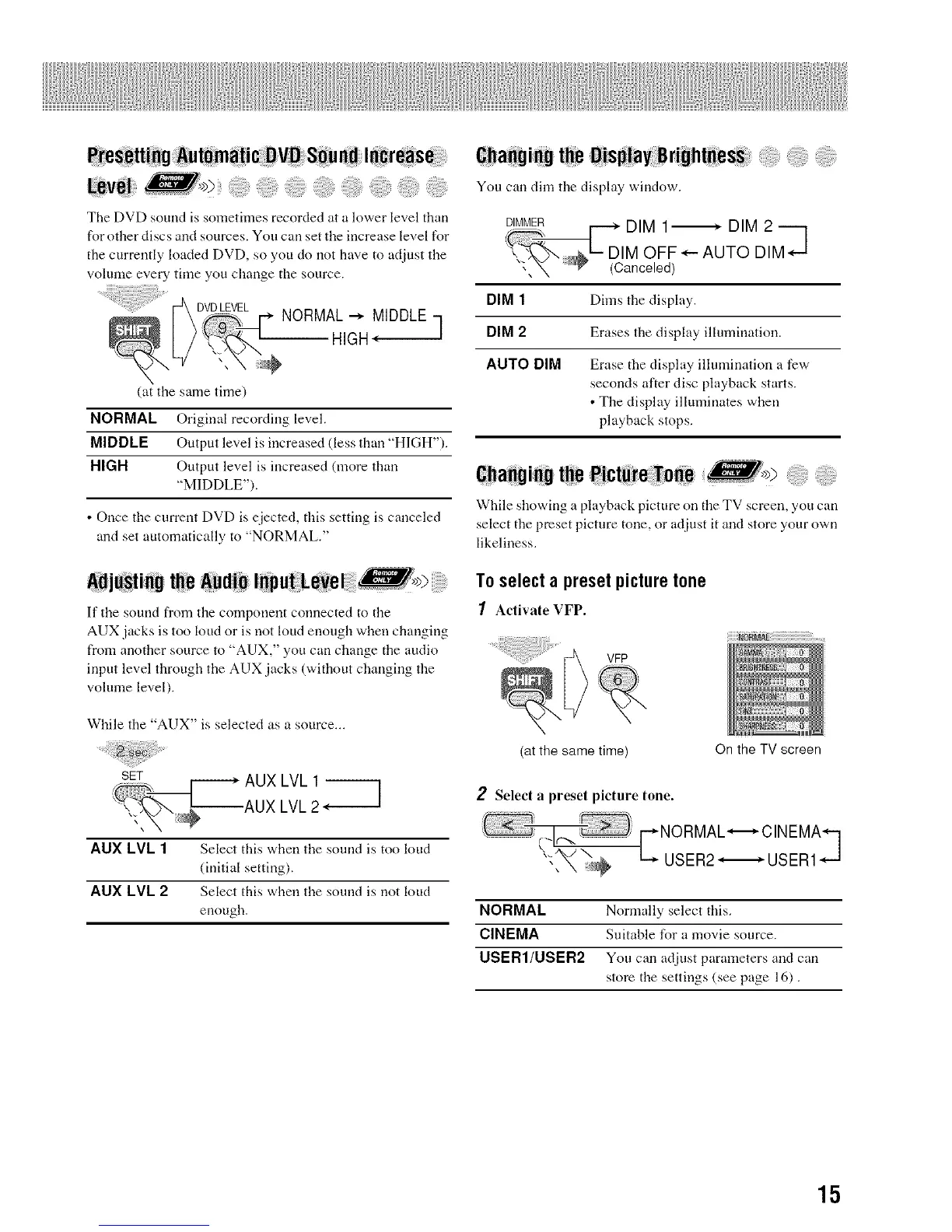
The DVD sound is sometimes recorded at a lower level than
for other discs and sources. You carl set the irrcrease level t'or
the currently loaded DVD, so you do not have to adjust the
volmne every time you change the source.
DVDLEVEL
NORMAL_ MIDDLE
HIGH*- ]
(at the same time)
NORMAL Original recording level.
MIDDLE Output level is irrcreased (less thau "HIGH").
HIGH Output level is irrcreased (more than
"MIDDLE").
• Once the current DVD is ejected, this setting is canceled
and set automatically to "NORMAL."
AdjO_ti_Othe AudibI_pu_LeVel >
If tire sound from the component connected to the
AUX jacks is too loud or is not loud enough when changing
from arrother source to "AUX," you can change the audio
irrput level through the AUX jacks (without changing the
volume level).
While the "AUX" is selected as a source...
AUX LVL 1_
AUX LVL 2
AUX LVL 1 Select this when tire sound is too loud
(initial setting),
AUX LVL 2 Select this when tire sound is not loud
enough.
6hahginUt_e :OjspiayB right_eS_
You can dim tire display window.
DIM 1_ DIM 2 ---]
= IM OFF*- AUTO DIM*- -J
'_.'_ (Canceled)
DIM 1 Dims the display.
DIM 2 Erases die display illumination.
AUTO DIM Erase the display illumination a few
seconds after disc playback starts.
• The display illuminates when
playback stops.
6hahgi:_Uthe:Nct_re _oee >
While showing a playback picture on the TV screen, you can
select the preset picture tone, or adjust it arrd store your own
likeliness.
To selecta preset picture tone
1 Activate VFP.
VFP
(at the same time) On the TV screen
2 Select a preset picture tone.
i NORMA,._.O,NEM _1
,._'_/ \ t_. USER2 .,_,. USER1.,...J
NORMAL Normally select this.
CINEMA Suitable for a movie source.
USER1/USER2 You can adjust parameters and can
store the settings (see page 16).
15


 To Next Page